Documentation: Memory Set Node
Overview
The Memory Set node stores a value in Redis under a key, with optional TTL (time to live). It is part of the memory nodes (memorynodes) that use Redis as shared storage between automation executions. Use this node when you need to save a value for later use by Memory Get, Memory Check, or other processes.
Node type: memory_set
Class: action
Package: pkg/automationnode/memorynodes
When to Use This Node
Use this node when you need to:
- Store computed or received data for reuse in the same automation or others
- Implement cache with expiration using
ttlfor temporary data (e.g. tokens, sessions) - Share data between automation executions (values in Redis persist across runs)
Node Configuration
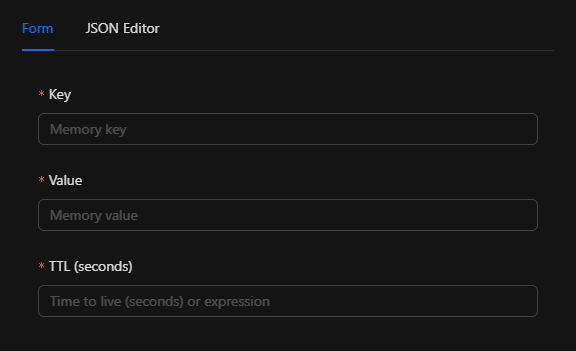
The node requires key and value, and optionally TTL. You can configure it in the Form view or the JSON Editor.
JSON Structure (Input Parameters)
{
  "key": "",
  "value": "",
  "ttl": ""
}
Required Fields
| Field | Type | Description |
|---|---|---|
key |
string | The key under which the value will be stored in Redis |
value |
string | The value to store |
Optional Fields
| Field | Type | Description |
|---|---|---|
ttl |
string | Time to live in seconds. Default "0" (no expiration) |
ttl = "0"or empty: the key never expires.ttl = "3600": the key expires in 1 hour (3600 seconds).
Fields can be defined using templates, for example: {{trigger.output_field}}.
Example Configuration
{
  "key": "session_data",
  "value": "session_data_123",
  "ttl": "3600"
}
Output
The node produces an object with the stored key and value:
| Field | Type | Description |
|---|---|---|
key |
string | The key used |
value |
string | The value stored |
Example Output
{
  "key": "session_data",
  "value": "session_data_123"
}
You can reference this output in subsequent nodes using template expressions, e.g. {{memory_set.key}}, {{memory_set.value}}.
Connectors
| Connector | Description |
|---|---|
continue |
Emitted whenever execution completes successfully |
On error, the flow depends on the node's OnError configuration.
Validation
keymust be a non-empty string.valuemust be a non-empty string.ttlis not validated in the validation phase; if provided, it must be a valid integer as a string (e.g."3600"). A non-numeric value will cause an error during execution.
Dependencies
- Redis: The node uses
redis_singleton.GetRedisProducer(). Redis configuration must be defined in environment variables (REDIS_URL,REDIS_PASSWORD).
Error Handling
- If
ttlis not a valid number, execution fails. - If Redis is unavailable or the
SEToperation fails, execution fails.
Related Nodes
| Node | Description |
|---|---|
Memory Get (memory_get) |
Retrieves a value; fails if the key does not exist |
Memory Check (memory_check) |
Checks if a key exists and retrieves value and TTL |
Typical Usage
- Store data for reuse: Save a computed or received value for use later in the same automation or others.
- Cache with expiration: Use
ttlfor temporary data (e.g. tokens, sessions). - Share between executions: Values in Redis persist across automation executions.
Example Flow
[Trigger] → [Memory Set (key: "token", value: {{http_response.body}}, ttl: "7200")] → [Next node]
Cache pattern: Set + Check + Get
[Memory Check (key: "cache_key")]
    ├─ not_in_memory → [Compute value] → [Memory Set] → [Use value]
    └─ in_memory     → [Memory Get or use Check output]
Internal Structure (Developer Reference)
The node is registered in pkg/nodelinker/node_linker.go:
"memory_set": memorynodes.NewMemorySetAutomationNode,
type MemorySetNode struct {
    Key   string
    Value string
    TTL   time.Duration // TTL in seconds, 0 = no expiration
}

type MemorySetAutomationNode struct {
    automation.AutomationNode
    MemorySetNode MemorySetNode
    logger        *zap.SugaredLogger
}