Documentation: Wait Node
Overview
The Wait Node introduces a configurable delay in the automation flow. When the execution reaches this node, it pauses for the specified duration (in seconds) before continuing to the next node. This is useful for rate limiting, scheduled sequences, or allowing time for external systems to complete an action.
When to Use This Node
Use this node when you need to:
- Add a delay between two actions (e.g., wait before sending a second notification)
- Respect rate limits of external APIs or devices
- Allow time for a device or system to complete an operation before the next step
- Build time-based sequences (e.g., open door → wait 5 seconds → close door)
- Space out retries or repeated actions
Node Configuration
The node has two configuration views: Form and JSON Editor. You can configure the delay using the visual form or by editing the JSON directly.
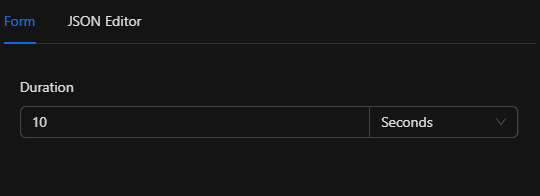
Form View
Duration
- In the "Duration" field, enter the number of seconds the automation should wait
- Use the unit selector on the right to choose the time unit (e.g. Seconds, Minutes, Hours). The value is stored in seconds in the node data
- The flow will pause for this duration before continuing to the next node
Examples:
- 10 seconds → short delay between steps
- 144000 seconds (40 hours) → long delay for scheduled or periodic flows
Note
The duration property in the node JSON is always expressed in seconds, regardless of the unit selected in the form. The form converts the value you enter to seconds when saving.
JSON Editor View
You can switch to the JSON Editor tab to view or edit the configuration as JSON.
JSON Structure
{
  "duration": 144000
}
Required Fields
| Field | Type | Description |
|---|---|---|
duration |
number | Delay time in seconds before continuing the flow |
Example Values
| Duration (seconds) | Approximate equivalent |
|---|---|
| 5 | 5 seconds |
| 60 | 1 minute |
| 3600 | 1 hour |
| 86400 | 1 day |
| 144000 | 40 hours |
Usage Examples
Example 1: Short Delay Between Actions
Use case: Send a notification, wait 10 seconds, then send a reminder.
Configuration:
- Duration: 10 seconds
JSON:
{
  "duration": 10
}
Example 2: Door Open Then Close Sequence
Use case: Open a door, wait for passage, then close (e.g. 15 seconds).
Configuration:
- Duration: 15 seconds
JSON:
{
  "duration": 15
}
Example 3: Long Delay (Scheduled or Periodic Flow)
Use case: Pause the flow for a long period (e.g. 40 hours) before the next step.
Configuration:
- Duration: 144000 seconds (40 hours)
JSON:
{
  "duration": 144000
}
Troubleshooting
Flow seems to continue immediately
Cause: Duration may be set to 0 or a very small value.
Solution: Verify the Duration value in the form or the duration value in the JSON. It must be a positive number (in seconds).
Wrong delay length
Cause: Confusion between units (seconds vs minutes vs hours).
Solution: Remember that the node always stores and uses seconds. If you use the form’s unit selector (e.g. Minutes), the value you enter is converted to seconds when saved. In JSON, always provide duration in seconds.
Best Practices
- Use reasonable delays: Very long waits (days) can tie up automation execution; consider scheduled triggers or splitting flows where appropriate.
- Document intent: In the automation or node name, briefly note why the wait is there (e.g. “Wait for door to close”, “Rate limit before next API call”).
- Combine with conditions: Use Wait together with conditional nodes when you need time-based logic or retries.