Documentation: DateTime Conditional Node
Overview
The DateTime Conditional Node evaluates conditions related to time, date, and day of the week, and branches the automation flow based on the final result.
If the evaluation is true, execution continues through the true route; otherwise it continues through the false route.
When to Use This Node
Use this node when you need to:
- Run actions only within a schedule (e.g., 09:00–17:00)
- Trigger flows only on specific days (weekdays, weekends, specific day names)
- Apply date-based rules (before/after/equal to a date)
- Handle time windows that cross midnight
Output Routes
This node has two routes:
true: runs when the final evaluation result is true.false: runs when the final evaluation result is false.
Node Configuration
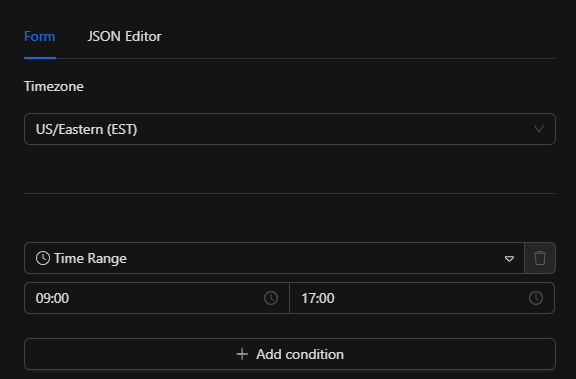
Step 1: Configure timezone (optional)
The timezone field defines the IANA timezone used to evaluate date/time.
- Type: string
- Example:
"America/Mexico_City" - Default:
UTC
Warning
If timezone is invalid, Validate() fails and Execute() returns an error.
Step 2: Add conditions (required)
The conditions field is a required array with the list of conditions (minimum 1).
Each condition is an object with:
id(string, required): unique identifier (used by the UI).type(string, required): condition type (see list below).value(depends on type): usually a string.startTime/endTime(only fortime_range):HH:MMformat (also acceptsH:MM).
Step 3: Set the combinator (optional)
The operator field combines multiple conditions:
- Values:
AND/OR - Default:
AND
Warning
If operator is any other value, validateInput() returns an error.
Supported condition types
time_range
True if the current time is between startTime and endTime (inclusive).
- Supports ranges that cross midnight (e.g.,
22:00→06:00).
day_of_week
True if the current day matches value.
value: English day names, case-insensitive.- Accepts forms like
"Monday"/"Mon","Tuesday"/"Tue"/"Tues", etc.
time_before
True if the current time is before value (HH:MM).
time_after
True if the current time is after value (HH:MM).
time_equals / exact_time
True if the current time (exact minute) is equal to value (HH:MM).
is_weekday
True if today is Monday–Friday.
is_weekend
True if today is Saturday or Sunday.
date_equals
True if the current date is equal to value (YYYY-MM-DD).
date_before
True if the current date is before value (YYYY-MM-DD).
date_after
True if the current date is after value (YYYY-MM-DD).
How multiple conditions are evaluated
- If
operator = "AND": all conditions must betrue. - If
operator = "OR": at least one condition must betrue.
Note
If a condition errors during evaluation, it is treated as false (and a warning is logged if a logger exists).
JSON Structure
The node configuration follows this structure:
{
  "conditions": [
    {
      "id": "19dfd8e8065",
      "type": "time_range",
      "startTime": "09:00",
      "endTime": "17:00"
    }
  ],
  "timezone": "US/Eastern",
  "operator": "AND"
}
Required fields
conditions(array) with at least one condition.conditions[].id(string).conditions[].type(string).- For
time_range:startTimeandendTime. - For
value-based conditions:value.
Optional fields
timezone(defaultUTC).operator(defaultAND).
Usage Examples
Example 1: Business hours (time_range)
Use case: allow actions only from 09:00 to 17:00 in a specific timezone.
{
  "conditions": [
    {
      "id": "cond-1",
      "type": "time_range",
      "startTime": "09:00",
      "endTime": "17:00"
    }
  ],
  "timezone": "America/Mexico_City",
  "operator": "AND"
}
Example 2: Night window crossing midnight
Use case: allow actions between 22:00 and 06:00 (inclusive).
{
  "conditions": [
    {
      "id": "cond-1",
      "type": "time_range",
      "startTime": "22:00",
      "endTime": "06:00"
    }
  ],
  "timezone": "UTC",
  "operator": "AND"
}
Example 3: Weekends only (is_weekend)
{
  "conditions": [
    {
      "id": "cond-1",
      "type": "is_weekend"
    }
  ],
  "operator": "AND"
}
Example 4: Monday and after 08:30 (AND)
{
  "conditions": [
    {
      "id": "cond-1",
      "type": "day_of_week",
      "value": "Mon"
    },
    {
      "id": "cond-2",
      "type": "time_after",
      "value": "08:30"
    }
  ],
  "timezone": "America/Bogota",
  "operator": "AND"
}
Troubleshooting
Error: invalid timezone
Cause: timezone is not a valid IANA timezone.
Fix: use a valid IANA timezone (e.g., "America/Mexico_City") or omit timezone to default to UTC.
Error: invalid operator
Cause: operator is not AND or OR.
Fix: use only AND or OR, or omit operator to use the default (AND).
Condition evaluates to false due to evaluation error
Cause: a condition failed during evaluation (e.g., invalid format).
Behavior: that condition is treated as false and a warning is logged if a logger exists.
Best Practices
- Set
timezoneexplicitly if your automation depends on a site's local time. - Use
time_rangefor windows andtime_before/time_afterfor simple cutoffs. - For complex logic, combine
AND/ORand split the flow into multiple conditional nodes when needed.