Documentation: Geofence Conditional Node (GPS Zones)
Overview
The Geofence Conditional Node evaluates whether objects with GPS position are inside or outside one or more zones (polygons). Zones can be defined as fixed polygons, as objects whose geometry defines the zone, or by tags that reference gps_zone-type zones.
If at least one object meets the condition (inside/outside according to activation_method), execution continues through the true route; otherwise through the false route.
When to Use This Node
Use this node when you need to:
- Trigger actions when a vehicle or asset enters or leaves a zone (warehouse, parking lot, restricted area)
- Detect when an object is outside allowed zones (intrusion or perimeter breach alerts)
- Combine fleets or domains with multiple zones defined by objects or tags
- Integrate geolocation logic into automations (routes, proximity, perimeters)
Output Routes
This node has two routes:
true: at least one object meets the condition (is inside or outside according toactivation_method) and object and zone were identified.false: no object meets the condition, or an error occurred during evaluation.
Node Output
The result is exposed in the node output as a map with:
| Field | Type | Description |
|---|---|---|
object_id |
string | ID of the object that met the condition (empty if none). |
domain |
string | Domain of the object (only when domains was used instead of objects_id). |
type_zone |
string | Origin of the zone: "object", "tag", or implicit if zone comes from polygon. |
value_zone |
string | Zone identifier (e.g., zone object_id or tag). |
If no object meets the condition, object_id is empty and the connector returned is false.
Node Configuration
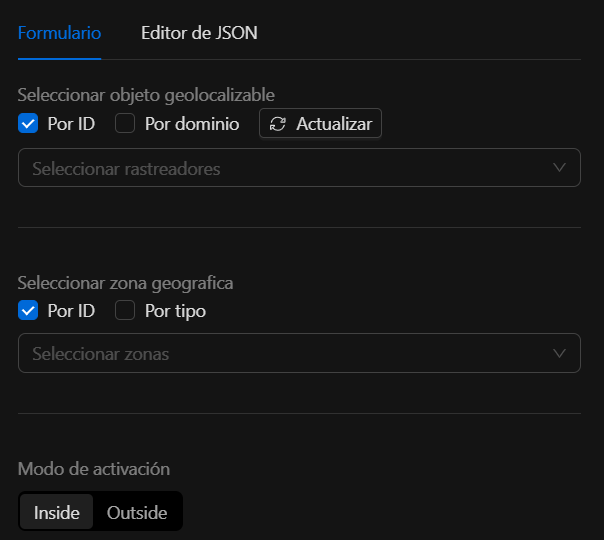
Required (at least one from each group)
1. Which objects to evaluate (one of the two):
| Field | Type | Description |
|---|---|---|
objects_id |
[]string | List of object IDs to track. Position is read from each object’s state (latitude / longitude in additional properties). |
domains |
[]string | List of domains; all objects in each domain are obtained and evaluated the same as with objects_id. |
2. Which zones to use (at least one of the three):
| Field | Type | Description |
|---|---|---|
zones_as_polygons |
[]ZoneAsPolygon | Explicitly defined polygons (list of points). |
zones_as_objects |
[]ZoneAsObject | Zones defined by objects; the polygon is read from the object’s state (points field in additional properties). |
zones_from_tags |
[]ZoneFromTag | Zones obtained by tag: objects of type gps_zone with that tag are found and their geometry is used. |
3. How to activate:
| Field | Type | Description |
|---|---|---|
activation_method |
string | inside: triggers when the object is inside at least one zone. outside: when it is outside all zones. both: accepted in validation (behavior depends on implementation). |
Warning
If at least one source of objects (objects_id or domains) or one source of zones (zones_as_polygons, zones_as_objects, or zones_from_tags) is missing, or if activation_method is invalid, Validate() returns an error.
Zone structures
ZoneAsPolygon
Polygon defined by a list of points.
| Field | Type | Description |
|---|---|---|
polygon |
[]Point | List of points in order (closed polygon). |
Each Point:
| Field | Type |
|---|---|
latitude |
float64 |
longitude |
float64 |
ZoneAsObject
Zone given by an object whose state contains the geometry.
| Field | Type | Description |
|---|---|---|
object_id |
string | ID of the object that represents the zone. |
The object’s state must have in additional properties a points field: JSON string with an array of points {"lat": <number>, "lng": <number>} (or latitude/longitude depending on implementation).
ZoneFromTag
Zones loaded by tag (gps_zone-type objects with that tag).
| Field | Type | Description |
|---|---|---|
tag |
string | Tag to filter gps_zone objects; their geometries are used as zones. |
Zone resolution
The engine resolves zones in this order:
- If
zones_as_polygonsis present, it is used as-is. - Otherwise, if
zones_as_objectsis present, each object’s state is fetched andpointsis parsed into a polygon. - Otherwise, if
zones_from_tagsis present,gps_zoneobjects are found by tag and polygons are built from their state. - If none of the three is present, all
gps_zonezones in the system are used (default integration behavior).
Only one of these sources is used; lists are not mixed.
Evaluation logic
- Object position: taken from the object’s latest state; additional properties must include
latitudeandlongitude(strings parseable to number). - Inside/outside: the Ray Casting (point-in-polygon) algorithm is used on each polygon. An object is “inside” if it is inside at least one zone.
- Order: objects are traversed first (by
objects_idor by eachdomains). The first object that meets the condition (inside/outside) causes the node to return thatobject_id, the corresponding zone index (and thustype_zone/value_zone) and connectortrue.
JSON structure
Minimal example (empty objects and zones; in real use you must define at least one source of objects and one source of zones):
{
  "zones_as_objects": [],
  "objects_id": [],
  "domains": [],
  "zones_from_tags": [],
  "activation_method": "inside"
}
Example: objects + polygons
{
  "objects_id": ["vehicle-001"],
  "zones_as_polygons": [
    {
      "polygon": [
        { "latitude": 19.4326, "longitude": -99.1332 },
        { "latitude": 19.435, "longitude": -99.1332 },
        { "latitude": 19.435, "longitude": -99.128 },
        { "latitude": 19.4326, "longitude": -99.128 }
      ]
    }
  ],
  "activation_method": "inside"
}
Example: domains + zones by object
{
  "domains": ["fleet-a"],
  "zones_as_objects": [{ "object_id": "zone-warehouse-1" }],
  "activation_method": "inside"
}
Object zone-warehouse-1 must have in its state (additional properties) a points field with a JSON array of points [{"lat": ..., "lng": ...}, ...].
Example: zones by tag
{
  "objects_id": ["asset-001"],
  "zones_from_tags": [{ "tag": "restricted-area" }],
  "activation_method": "outside"
}
Objects of type gps_zone with tag restricted-area are found; if object asset-001 is not inside any of those zones, the node exits through true.
Troubleshooting
Validation error: missing objects or zones
Cause: at least one source of objects (objects_id or domains) or one source of zones (zones_as_polygons, zones_as_objects, or zones_from_tags) was not defined.
Fix: configure at least one entry in objects_id or domains, and at least one zone in one of the three zone arrays.
Error: invalid activation_method
Cause: activation_method is not inside, outside, or both.
Fix: use only inside, outside, or both.
Node always returns false
Possible causes:
- Objects do not have
latitudeandlongitudein their state (additional properties). - Zone objects do not have a
pointsfield in state with valid JSON format. - With
activation_method: "outside", the object is inside at least one zone (so it does not satisfy “outside all”).
Fix: verify object state and zone geometry in the automation runtime.
Best practices
- Ensure tracked objects (e.g., GPS Tracker) expose
latitudeandlongitudein their state. - For reusable zones, use objects or tags (
zones_as_objects,zones_from_tags) instead of fixed polygons in JSON when possible. - For “alert if leaving allowed zone”, use
activation_method:"outside"and define the allowed zones. - The algorithm is point-in-polygon (Ray Casting); radius and earth curvature are not considered.