Documentation: IF Conditional Node
Overview
The IF Conditional Node evaluates one or more conditions and branches the automation flow based on the result. If the evaluation is true, execution continues through the true route; otherwise it continues through the false route.
When to Use This Node
Use this node when you need to:
- Make decisions inside an automation (if/then/else)
- Validate data before executing an action
- Apply filters (e.g., only process events containing specific text)
- Build rules with multiple combined conditions
Output Routes
This node has two routes:
true: runs when the final evaluation result is true.false: runs when the final evaluation result is false.
Node Configuration
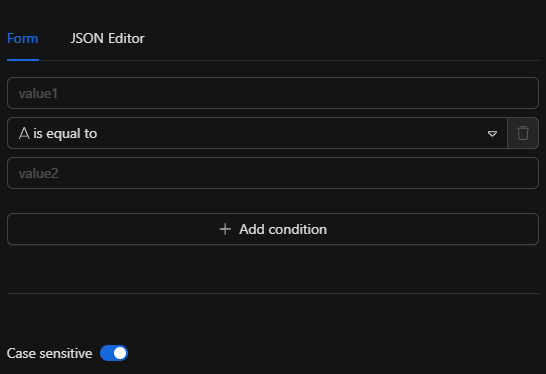
Step 1: Set the conditions combinator
The combinator field defines how the conditions array is combined:
AND: all conditions must be true.OR: at least one condition must be true.
Step 2: Add conditions
The conditions field is a required array with the list of conditions to evaluate. Each condition requires:
id(string, required): unique condition identifier (used by the UI).leftValue(string): left-hand value (text to evaluate).operator(object, required):name(string): UI label (does not affect logic).operation(string): operation (see table below).type(string):stringornumber(other types currently return an error).singleValue(bool): applies only tonumber(see details below).rightValue(string): required for most comparisons (except “single value” operations innumber).
Note
For string operators, values are compared as text. This includes “greater/less” comparisons, which are lexicographic (for example, "10" < "2" may evaluate to true).
Step 3: Comparison options
In options you can configure:
caseSensitive(bool): iffalse, forstringconditions the node lowercasesleftValueandrightValuebefore comparing.
Supported operations
String operators (operator.type = "string")
Single-value (do not use rightValue):
| operation | Description |
|---|---|
exists |
leftValue exists (is not empty) |
does not exist |
leftValue does not exist (is empty) |
is empty |
leftValue is empty |
is not empty |
leftValue is not empty |
Comparison / search:
| operation | Description |
|---|---|
is equal to |
Equality |
is not equal to |
Inequality |
contains |
Contains |
does not contain |
Does not contain |
starts with |
Starts with |
does not start with |
Does not start with |
ends with |
Ends with |
does not end with |
Does not end with |
matches regex |
Uses rightValue as regex pattern and leftValue as text |
does not match regex |
Negation of matches regex |
“Greater/less” comparisons (lexicographic):
| operation | Description |
|---|---|
is greater than |
leftValue > rightValue (text) |
is less than |
leftValue < rightValue (text) |
is greater than or equal to |
leftValue ≥ rightValue (text) |
is less than or equal to |
leftValue ≤ rightValue (text) |
Note
If you need numeric comparisons (e.g., 10 vs 2), use operator.type = "number" with singleValue = false.
Number operators (operator.type = "number")
If singleValue = true (does not parse to number; evaluates the leftValue string):
| operation | Description |
|---|---|
exists |
leftValue exists (is not empty) |
does not exist |
leftValue does not exist (is empty) |
is empty |
leftValue is empty |
is not empty |
leftValue is not empty |
If singleValue = false (parses leftValue and rightValue as float64):
| operation | Description |
|---|---|
is equal to |
Numeric equality |
is not equal to |
Numeric inequality |
is greater than |
Greater than |
is less than |
Less than |
is greater than or equal to |
Greater than or equal to |
is less than or equal to |
Less than or equal to |
Warning
If leftValue or rightValue are not numeric in numeric comparisons (singleValue = false), the node returns an error.
JSON Structure
The node configuration follows this structure:
{
  "combinator": "AND",
  "conditions": [
    {
      "id": "a6e0e332d43",
      "leftValue": "",
      "rightValue": "",
      "operator": {
        "type": "string",
        "operation": "is equal to",
        "name": "is equal to",
        "singleValue": true
      }
    }
  ],
  "options": {
    "caseSensitive": true
  }
}
Required fields
conditions(array) with at least one valid condition.conditions[].id(string).conditions[].operator(object) includingtypeandoperation.
Optional fields
combinator(often defaults toANDif omitted).conditions[].leftValue,conditions[].rightValue(depending on operation).options.caseSensitive(defaults totrue).
Usage Examples
Example 1: Text equality (string)
Use case: route based on an exact tag match.
{
  "combinator": "AND",
  "conditions": [
    {
      "id": "cond-1",
      "leftValue": "{{context.tag}}",
      "rightValue": "alarm",
      "operator": {
        "type": "string",
        "operation": "is equal to",
        "name": "is equal to",
        "singleValue": true
      }
    }
  ],
  "options": {
    "caseSensitive": false
  }
}
Result: if {{context.tag}} is "Alarm" or "alarm", the node takes the true route.
Example 2: Multiple conditions with AND
Use case: only continue if the message is present and contains a keyword.
{
  "combinator": "AND",
  "conditions": [
    {
      "id": "cond-1",
      "leftValue": "{{context.message}}",
      "rightValue": "",
      "operator": {
        "type": "string",
        "operation": "is not empty",
        "name": "is not empty",
        "singleValue": true
      }
    },
    {
      "id": "cond-2",
      "leftValue": "{{context.message}}",
      "rightValue": "intrusion",
      "operator": {
        "type": "string",
        "operation": "contains",
        "name": "contains",
        "singleValue": true
      }
    }
  ],
  "options": { "caseSensitive": false }
}
Example 3: Numeric comparison (number)
Use case: take the true route when temperature is above 28.5.
{
  "combinator": "AND",
  "conditions": [
    {
      "id": "cond-1",
      "leftValue": "{{context.temperature}}",
      "rightValue": "28.5",
      "operator": {
        "type": "number",
        "operation": "is greater than",
        "name": "is greater than",
        "singleValue": false
      }
    }
  ],
  "options": { "caseSensitive": true }
}
Note
For number with singleValue = false, leftValue and rightValue must be numeric strings (e.g., "28.5"). Otherwise, the node returns an error.
Troubleshooting
Error: unsupported operator type
Cause: operator.type is not string or number.
Fix: use only string or number.
Error: invalid numeric comparison
Cause: singleValue = false and one of the values cannot be parsed as float64.
Fix: ensure both leftValue and rightValue are numeric (no extra text).
Error: invalid regex
Cause: invalid rightValue pattern in matches regex / does not match regex.
Fix: correct the pattern and test it with a sample value.
Best Practices
- Use
number(withsingleValue = false) for real numeric comparisons. - If you receive user input / variable text, consider
caseSensitive: falseto avoid false negatives. - Keep conditions simple; if the rule grows, split it across multiple IF nodes.