Netsocs Architecture
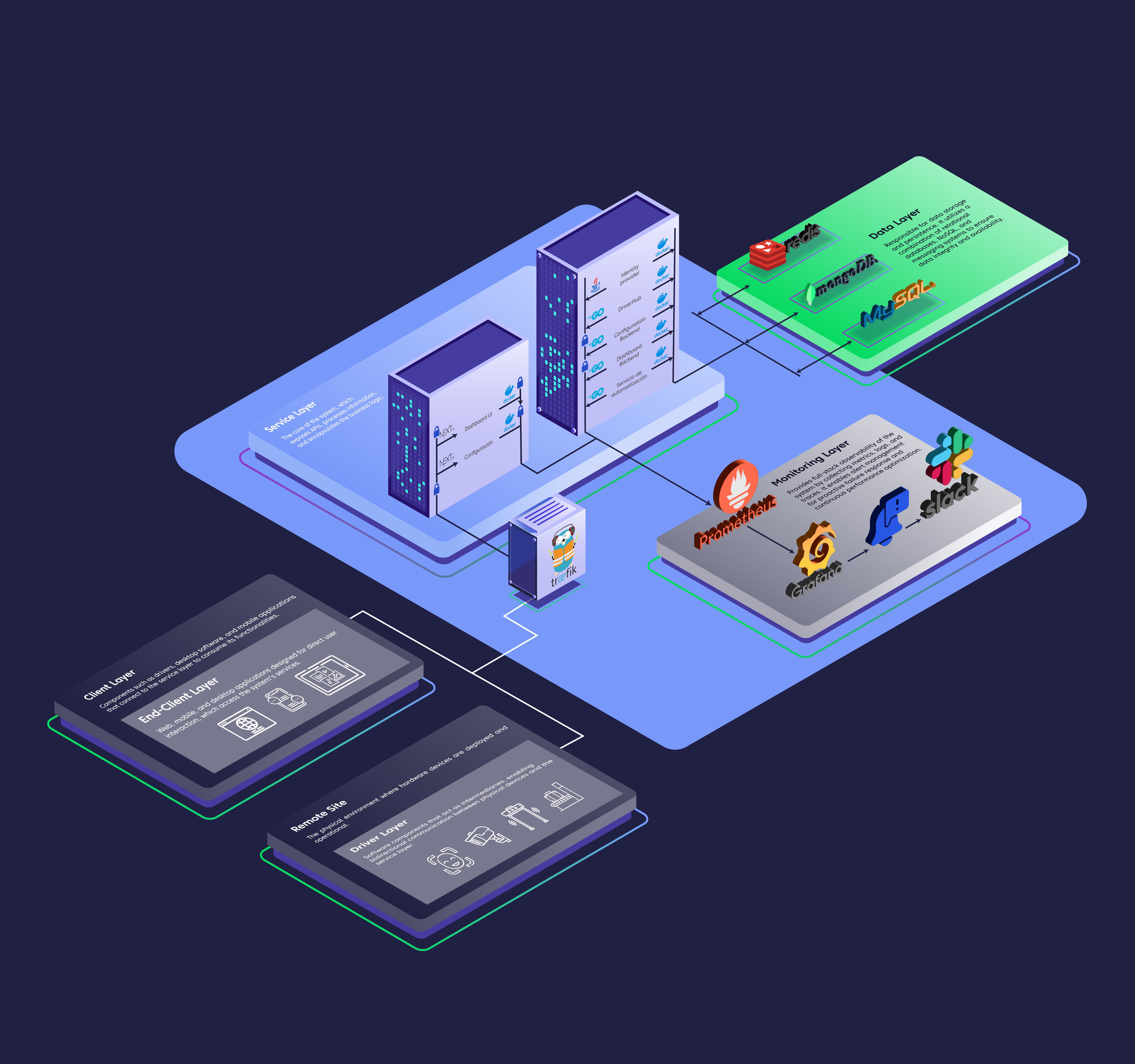
Netsocs employs a distributed microservices-based architecture, complemented by multiple specialized databases according to the use case. This modular architecture allows each component to function within a single server or be distributed across multiple servers, making it easy to scale the solution to manage thousands of objects per installation.
All components are designed to run on Docker containers, making Netsocs a truly multi-platform solution. It can be deployed in on-premise environments (at the client's facilities), as a SaaS (Software as a Service), in hybrid configurations combining both models, or on container orchestrators such as Kubernetes.
INFO This section is aimed at system administrators, DevOps personnel, and developers interested in understanding the internal workings of the platform.
Advantages of Running Netsocs on Kubernetes
When running Netsocs on Kubernetes, the solution gains significant additional benefits:
- Automatic scalability: Kubernetes dynamically adjusts resources based on demand, increasing or reducing microservice instances without manual intervention.
- High availability: If a component fails, Kubernetes automatically restarts it and redistributes the load, ensuring service continuity.
- Simplified update management: Enables deploying new versions with zero downtime through rolling updates.
- Resource optimization: Efficiently distributes containers across available servers, maximizing hardware utilization.
- Full portability: The same configuration works on any cloud provider (AWS, Azure, Google Cloud) or local infrastructure that supports Kubernetes.
- Disaster recovery: Facilitates the configuration of geographically distributed replicas and automated backups.
Architecture Components
Client Layer
End-clients
This layer represents the point of interaction between end users and Netsocs, either through the web browser or mobile application. Users connect to the server hosting Traefik, the component that acts as the gateway and traffic router to the different microservices in the system.
By default, Netsocs uses Caddy for automatic SSL/TLS certificate generation, simplifying the configuration of secure connections via HTTPS. Caddy was chosen for its ability to obtain and renew certificates completely automatically with Let's Encrypt, eliminating the complexity of manual management. In internal network environments with private certificates, client devices will need to have these certificates installed to establish secure connections.
Remote Site
Netsocs has the ability to integrate with devices regardless of their geographic location or network configuration through a concept called a site. A site is a distributed component that acts as a bridge between the main Netsocs installation and field devices.
Each site hosts specialized drivers that establish bidirectional communication with the central installation: they send device information to Netsocs and receive instructions that they then execute locally. The drivers interpret these instructions and communicate directly with devices using their native protocols (Modbus, BACnet, SNMP, among others).
A fundamental characteristic of the site is its local storage of events and state changes. This guarantees that, in the event of a temporary loss of connectivity with the main installation, no data is lost. Once the connection is restored, all stored information is automatically synchronized, maintaining system integrity.
Driver Layer
Drivers are essential components that act as translators between Netsocs and field devices. Each driver is a specialized piece of software that uses the device's native integration protocols (such as Modbus, BACnet, SNMP, OPC-UA, among others) to establish bidirectional communication.
How It Works
The operation cycle of a driver includes:
- Instruction reception: The driver receives commands from Netsocs (for example, changing a setpoint, activating an actuator, requesting readings).
- Translation and execution: Converts these instructions to the device-specific protocol and executes them.
- Data collection: Captures events, state changes, alarms, and variable values from the device.
- Sending to site: Transmits all collected information to the local site, which subsequently synchronizes it with the main Netsocs installation.
Certification and Documentation
Each driver is backed by a certification manual that documents:
- Integration tests performed and results obtained.
- Objects and data points that the driver creates in Netsocs.
- Communication diagrams and data flows with the device.
- Technical requirements, limitations, and recommended configurations.
- Operational details relevant to end users.
This documentation ensures transparency and facilitates the correct implementation of each integration.
Criticality and Recommendations
Drivers are extremely critical components in the Netsocs architecture: if a driver is unavailable, communication between the system and associated devices is completely interrupted. For this reason, it is strongly recommended to:
- Implement redundancy: Deploy duplicate drivers on different sites or servers when possible.
- Configure active monitoring: Set up automatic alerts for driver failures or disconnections.
- Create automations: Design automatic responses to disconnection events (notifications, reconnection attempts, activation of backup drivers).
- Perform preventive maintenance: Periodically review logs and performance metrics of drivers.
Service Layer
Netsocs UI (Frontend)
Represents the complete operational interface that runs in the web browser of users interacting with Netsocs. This layer constitutes the entire visual and interactive experience through which operators, administrators, and end users manage the system, visualize real-time data, configure devices, analyze trends, and execute control actions.
Interface Characteristics:
- Responsive design: The interface automatically adapts to any screen size, ensuring an optimal experience on desktops, tablets, and smartphones.
- Multi-platform access: Running in the browser, users can access from any operating system (Windows, macOS, Linux, iOS, Android) without needing to install specific applications, except for the optional native mobile app.
- Optimized touch experience: On mobile devices and tablets, controls are designed for touch interaction, with appropriately sized buttons and elements.
Main Components:
The interface includes modules such as customizable dashboards with real-time charts, device control panels, alarm and event management, system configuration, reports and analytics, as well as user and permission management tools.
Driverhub (Core)
The DriverHub is the central and critical service of Netsocs, responsible for orchestrating all driver operations and, by extension, integrations with field devices. This critical component acts as the brain of the system, coordinating bidirectional communication between the platform and distributed sites, processing millions of data points, and ensuring the operational coherence of the entire infrastructure.
Action and Command Management:
- Intelligent queuing: Receives commands from the user interface, automations, business rules, or external APIs, and queues them prioritized by criticality and dependencies.
- Validation and security: Verifies user permissions, parameter coherence, and operational restrictions before executing any command.
- Routing: Determines which specific driver should receive each instruction and through which site it should be transmitted.
- Execution tracking: Maintains complete traceability of each command's state (pending, running, completed, failed) and response times.
- Retry handling: Implements automatic retry policies with exponential backoff for temporary communication failures.
- Responses and confirmations: Processes driver responses and updates system state in real time.
Site Administration:
- Registration and discovery: Maintains an updated inventory of all active sites, their capabilities, software versions, and available drivers.
- Health monitoring: Continuously supervises connectivity status, latency, resource usage, and availability of each site.
- Configuration synchronization: Distributes configuration changes, credential updates, and operational policies to corresponding sites.
- Intermittent connectivity management: Intelligently handles connection loss and recovery scenarios, ensuring no data or commands are lost.
- Load balancing: Distributes operational load across multiple sites when redundant configurations exist.
Comprehensive Audit System:
- User action logging: Captures who performed what action, from what device, at what time, and with what result.
- Command traceability: Documents the complete flow of each command from its origin to its execution on the end device.
- Configuration changes: Records all modifications made to device, site, driver, and general system configuration.
- Access attempts: Monitors both successful and failed accesses to detect potential security threats.
- Regulatory compliance: Generates records that facilitate compliance with regulations such as GDPR, SOC 2, or specific industrial standards.
- Configurable retention: Allows defining log retention policies based on criticality and legal requirements.
Real-Time Event Management:
- Massive ingestion: Capable of processing thousands of events per second from multiple sites simultaneously.
- Normalization: Standardizes events from different manufacturers and protocols to a common format.
- Filtering and enrichment: Applies filtering rules, discards duplicates, and enriches events with additional context (location, criticality, related device).
- Event correlation: Identifies patterns and relationships between apparently independent events to detect complex situations.
- Selective distribution: Routes events to appropriate subscribers (user interface, alarm engine, external systems, automation rules).
- Historical storage: Persists events in databases optimized for temporal queries and retrospective analysis.
State Change Processing:
- Change detection: Identifies modifications in variable values, device operational states, and system conditions.
- State propagation: Instantly updates views of all connected users when changes occur.
- Conflict management: Resolves situations where multiple commands attempt to modify the same object simultaneously.
- State cache: Maintains an in-memory representation of the most recent states for instant response.
- Persistence: Ensures state changes are durably stored in the corresponding databases.
- Post-disconnection synchronization: Reconciles states when a site recovers connectivity after operating in offline mode.
Reports and Business Intelligence:
- Data aggregation: Consolidates information from multiple sources to create unified views.
- Scheduled reports: Automatically generates reports at defined intervals (daily, weekly, monthly).
- On-demand reports: Allows authorized users to generate ad-hoc reports with custom parameters.
- Multiple formats: Exports reports in PDF, Excel, CSV, JSON, and other standard formats.
- KPIs and metrics: Calculates key performance indicators such as uptime, energy efficiency, and response times.
Predictive Operations and Machine Learning:
- Anomaly detection: Identifies unusual patterns in device behavior that could indicate imminent failures.
- Predictive maintenance: Analyzes historical trends to predict when equipment will require maintenance before it fails.
- Energy optimization: Learns consumption patterns and suggests optimization strategies.
- Load prediction: Anticipates future demands based on historical patterns and contextual variables (weather, occupancy, calendar).
Automation Service
The Netsocs Automation Service is a workflow orchestration platform that enables creating, managing, and executing complex automations through a graph-based execution model. The service provides a REST API for complete automation management and their executions, with support for triggers, conditional logic, and various types of action nodes.
Authentication and Authorization
Authentication and authorization in Netsocs is managed by Keycloak, the platform's centralized Identity and Access Management (IAM) system. It acts as the security guardian, controlling who can access the system, what permissions each user has, and how identities are securely validated.
Protocol and Feature Matrix:
| Category | Feature | Description |
|---|---|---|
| Core Protocols | SAML 2.0 | Full support for authentication and authorization data exchange between security domains. |
| OpenID Connect (OIDC) | Identity layer on top of OAuth 2.0 protocol for modern authentication. | |
| OAuth 2.0 | Industry standard for API authorization delegation. | |
| Federation | Identity Brokering | Ability to delegate authentication to external providers (Google, GitHub, Facebook, etc.). |
| User Federation | Synchronization with existing user bases such as LDAP or Active Directory. | |
| Security | Single Sign-On (SSO) | Single login to access multiple connected applications. |
| Single Sign-Out | Centralized logout across all linked applications. | |
| Multi-Factor (MFA) | Native support for OTP (Google Authenticator, FreeOTP) and WebAuthn. | |
| Management | User Self-Service | Panel for users to manage their own account, passwords, and sessions. |
| Role-Based Access (RBAC) | Permission assignment based on hierarchical roles and groups. |
Data Flow
Device → Netsocs Client (Inbound)
This flow describes how data generated by a physical device reaches the end user's screen:
- Device generates data: A field device (sensor, camera, alarm panel, etc.) produces an event or state change (e.g., a temperature sensor exceeds a threshold).
- Driver captures the event: The driver running on the site communicates with the device using its native protocol (Modbus, BACnet, SNMP, etc.) and captures the raw data.
- Driver sends to site: The driver transmits the normalized event to the local site service via the internal TCP connection (port 3197). If connectivity is lost, the site buffers the event locally until the connection is restored.
- Site forwards to DriverHub: The site sends the event to the central DriverHub over an HTTPS connection, passing through Traefik for validation and routing.
- DriverHub processes: The DriverHub normalizes, enriches, and routes the event. It updates the in-memory state cache, persists the change to MongoDB (
state_changes,events) and/or MySQL (depending on the data domain), and publishes a notification to the Redis pub/sub channel. - Real-time distribution: Services subscribed to the Redis channel (UI server, automation engine, alarm engine) receive the notification immediately.
- Client receives update: The Netsocs UI delivers the state change to all connected user sessions in real time via WebSocket, updating dashboards, maps, synoptics, and alert panels without requiring a page refresh.
Netsocs Client → Device (Outbound)
This flow describes how a user action reaches the physical device:
- User issues a command: An operator clicks a control in the Netsocs UI (e.g., "open door", "activate relay", "change setpoint") or an automation rule triggers automatically.
- Request reaches Traefik: The HTTPS request is received by Traefik, which validates the authentication token via Keycloak and routes it to the DriverHub.
- DriverHub validates and queues: The DriverHub verifies user permissions (via Redis cache), validates the command parameters, and enqueues it with the appropriate priority for the target driver.
- Command dispatched to site: The DriverHub sends the command to the corresponding site over HTTPS, referencing the specific driver and device.
- Site delivers to driver: The site receives the command and dispatches it to the target driver using the local service (systemctl-managed process).
- Driver translates and executes: The driver converts the Netsocs command into the device's native protocol and sends it directly to the hardware.
- Device confirms: The device executes the action and sends a confirmation or updated state back to the driver.
- Result propagates: The driver captures the confirmation and sends it back up the chain (driver → site → DriverHub), which updates the system state and notifies connected users in real time.
TIP If the site loses connectivity with the DriverHub during command execution, the command is retained in the queue and retried with exponential backoff. State changes captured offline are synchronized automatically once connectivity is restored.
Integration with Standard IT Technology
Docker
Docker is used to isolate application processes, libraries, and configurations from the host operating system. This enables:
- Portability: Immediate deployment on any infrastructure (Cloud, On-premise).
- Isolation: Avoid conflicts between language versions or dependencies.
- Efficiency: Lower resource consumption compared to traditional virtual machines.
MySQL
For relational data persistence, the architecture uses MySQL (Version 8.0+). This engine was selected for its maturity, strict compliance with ACID properties, and excellent performance under intensive read/write workloads.
Role in the Architecture
MySQL acts as the Source of Truth for:
- User and session management.
- System metadata storage.
- Transactional records.
Configuration and Optimization
| Parameter | Configuration | Justification |
|---|---|---|
| Engine | InnoDB |
Transaction support and failure recovery. |
| Charset | utf8mb4 |
Full compatibility with emojis and international characters. |
| Max Connections | 150 |
Load control to avoid RAM saturation. |
| Connection Pool | Managed by App | Avoids overhead from constantly opening/closing connections. |
Docker Integration
- Persistence: A Docker Volume mapped to
/var/lib/mysqlis used to ensure data is not lost if the container is restarted or updated. - Environment Variables: Parameters such as
MYSQL_ROOT_PASSWORDandMYSQL_DATABASEare managed externally to avoid exposing secrets in source code.
Backup and Maintenance Strategy
- Automatic Backups: Daily execution of
mysqldump, compressing the result into.sql.gzfiles. - Integrity: Restoration tests are periodically performed in Staging environments to verify backup validity.
- Error Logs: Centralized through Docker's log driver to monitor deadlocks or Slow Queries.
WARNING MySQL is configured to accept connections only from the internal Docker network. Port
3306must not be mapped to the host in production environments unless strictly necessary for auditing tasks.
Deployment Strategies
Scenario A: Containerized MySQL (Ideal for Dev/Staging/CI-CD)
- Advantages: One-click deployment via
docker-compose, full environment parity, and complete isolation. - Data Management: Strict use of external Volumes is required to prevent data loss during the container lifecycle.
- Configuration: Recommend limiting memory resources (
mem_limit) in the compose file to prevent a database leak from affecting other microservices.
Scenario B: External / Bare Metal / Managed MySQL (Recommended for Production)
- Performance: Direct access to host hardware and file system, eliminating Docker network layer overhead.
- Resilience: Facilitates implementation of read replicas, high availability (HA) clusters, and infrastructure-level snapshots.
- Connectivity: The application connects via the external server's Endpoint or IP. Security groups and firewalls must be correctly configured to allow traffic from Docker nodes.
Decision Matrix:
| Feature | MySQL in Docker | External / Managed MySQL |
|---|---|---|
| Persistence | Docker Volumes dependent | Independent (EBS, SAN, etc.) |
| Scalability | Vertical (host-limited) | Horizontal (read replicas) |
| Backups | docker exec + mysqldump |
Native snapshots / Point-in-time recovery |
| Recommended use | Development, QA, Micro-deployments | Production, Big Data, High Concurrency |
Data Domains and Persistence Responsibilities
A. Identity and Access Management (IAM)
Based on the Keycloak schema, MySQL stores the entire security infrastructure:
- Realms and Clients: Security domain configuration, registered applications, and OIDC/SAML authentication flows.
- Users and Credentials: Encrypted storage of identities, attributes, group membership, and role mapping (RBAC).
- Federation and External Identity: External identity provider (IdP) configurations and protocol mappings.
B. Physical Access Control and People Management (AC)
- Core Entities: Registration of people, companies, visits, and identification types.
- Access Configuration: Access levels, door policies, schedules, and required documents.
- Site Infrastructure: Definition of sites, subsystems, and location points.
C. Device and IoT Management
- Hardware Inventory: Registration of devices, sensors, alarms, and their associated permission policies.
- Operational State: User-device policies and manufacturer/brand configurations.
D. Orchestration and Automation
- Automation Engines: Definition of flows, execution nodes, connections, and automatic trigger results.
- System Jobs: Scheduling of maintenance tasks, event cleanup, and scheduled reports.
E. Interface Personalization and Observability (Dashboarding)
- Dynamic Layouts: Custom configuration of dashboards, widgets, tabs, and user preferences.
- Logs and Auditing: Persistent storage of event logs, security audit logs, and display filters.
MongoDB
Netsocs uses MongoDB as the document persistence engine to manage unstructured, high-velocity data. Its design allows storing large volumes of information from IoT devices and audit logs without the rigidity of a relational schema, facilitating horizontal scalability.
Collections in MongoDB are optimized for write-intensive operations and time-series queries:
A. Device Telemetry and States
device_state_changes/state_changes: Detailed historical record of hardware and logical component state transitions.gps_tracks: Geospatial coordinate and route storage, optimized for geofencing queries and historical tracking.
B. Events and System Auditing
events: Central repository of events generated by the system (alerts, system logs, notifications).user_audits: User activity logging for compliance and forensics, maintaining an immutable trail of actions on the platform.
C. Logic and Action Execution
object_actions/object_actions_execution: Definition and tracking of actions executed on system objects, including execution results and process errors.
D. Analytics and Visual Representation
kpis: Storage of calculated key performance indicators for quick visualization on dashboards.synoptics: Configuration of synoptic diagrams and dynamic graphical representations of the plant or site.meet_rooms: State and metadata management specific to meeting room booking and operation.
IT Infrastructure Considerations
- Indexing Strategy: Geospatial Indexes (2dsphere) are required for the
gps_trackscollection, and TTL Indexes (Time-To-Live) foreventsorstate_changescollections if automatic purging of old data is desired. - Memory Management: MongoDB makes intensive use of the WiredTiger Cache. The container should have dedicated memory reserved to avoid disk swapping, which would degrade telemetry performance.
- Docker Persistence: The data volume (
/data/db) should reside on solid-state storage (SSD) to support the IOPS generated by the constant flow ofstate_changes.
Security and Connectivity
- Authentication: Implemented via SCRAM-SHA-256 mechanism.
- Isolation: The instance must not be accessible from public networks. Access is limited to the backend subnet and administrative tools (such as MongoDB Compass) via SSH tunnel or VPN.
Redis
Redis is a high-speed in-memory data storage system that fulfills two fundamental roles in the architecture:
1. Inter-Service Messaging
Redis acts as a communication channel (pub/sub) that allows different system components to communicate with each other efficiently and in real time, without needing to know each other directly.
Active communication channels:
- Device configuration: Channel for sending and receiving hardware configurations.
- Video services: Channel for requests and responses related to recordings.
- Event management: Channel for creating and notifying system events.
- State changes: Channel for notifying modifications in object states.
2. High-Performance Cache
Redis functions as fast-access temporary memory that stores frequently queried information, avoiding the need to repeatedly look it up in the main database.
Currently used as cache to optimize the object permissions module:
- Permissions assigned to each user.
- Resource identifiers by type and user.
- Specific permission verifications on entities.
TIP Information is kept in cache for 1 minute. After that time, it is considered stale and queried again from the primary source to ensure always working with up-to-date data.
Traefik
Traefik is the unified entry point of the platform, acting as an Application Gateway (API Gateway) that manages all traffic entering the system. It is the only contact point visible to the outside world; all communications with the platform pass through Traefik before reaching internal services.
Intelligent Service Routing
Traefik directs each request to the appropriate service based on the requested path, domain, or request headers. Internal services don't need to be visible from the outside, allowing internal architecture reorganization without affecting users.
Security Middleware (Security Headers)
Traefik automatically configures HTTP security headers following OWASP best practices:
- Strict-Transport-Security (HSTS): Forces browsers to always use HTTPS connections, preventing protocol downgrade attacks.
- X-Frame-Options: Set to
sameoriginto prevent clickjacking attacks. - X-Content-Type-Options: Set to
nosniffto prevent malicious files from being interpreted as executables. - Content-Security-Policy (CSP): Defines a detailed policy on what resources the application can load (scripts, styles, fonts, images, workers, external connections).
- X-Permitted-Cross-Domain-Policies: Set to
none, prevents access via legacy technologies like Flash or PDF from other domains. - Cross-Origin-Opener-Policy: Set to
same-originto isolate the browser window from other origins. - Cache-Control: Configured to not store information in cache, always ensuring the most recent data.
- Referrer-Policy: Sends full reference information only within the same HTTPS protocol.
- Server information concealment:
ServerandX-Powered-Byheaders are removed to make it harder for attackers to identify platform vulnerabilities.
Authentication and Authorization Management
Traefik acts as the first identity validation point. If credentials are invalid or absent, it rejects the request immediately without contacting the destination service. Protection types:
- Authentication token validation.
- Active session verification.
- Role-based access control.
- Basic HTTP authentication (when applicable).
Threat Protection
- Rate Limiting: Prevents a user or IP from making too many requests in a short time, protecting against denial-of-service attacks.
- Malformed request filtering: Rejects requests that don't comply with HTTP standards.
- Origin control (CORS): Defines which external domains can access platform resources.
- Size validation: Limits request size to prevent overload attacks.
Caddy (Optional)
Caddy is a modern web server used primarily to provide SSL/TLS certificates automatically and without complex configuration. Its main feature is the ability to obtain, install, and renew HTTPS security certificates without manual intervention, using Let's Encrypt.
Caddy acts as a fast SSL/TLS provider, enabling the platform to have secure connections immediately and without the typical complexity associated with certificate management.
Keycloak
Keycloak is the platform's centralized Identity and Access Management (IAM) system. It is the solution that allows users to log in once and access all platform services without needing to authenticate repeatedly in each one (Single Sign-On).
Keycloak is the identity control center of the entire platform, responsible for:
- Validating user identity (authentication).
- Determining what each user can do (authorization).
- Managing user sessions securely.
- Providing a single access point (Single Sign-On).
- Managing credentials and security policies.