Action: MySQL (mysql)
This node allows an automation to query, insert, update or delete data in a MySQL database. Use it to log security events, read access lists, update visit statuses, audit device activity, or run any SQL operation against an existing database in the installation.
Screenshots
The node on the automation canvas
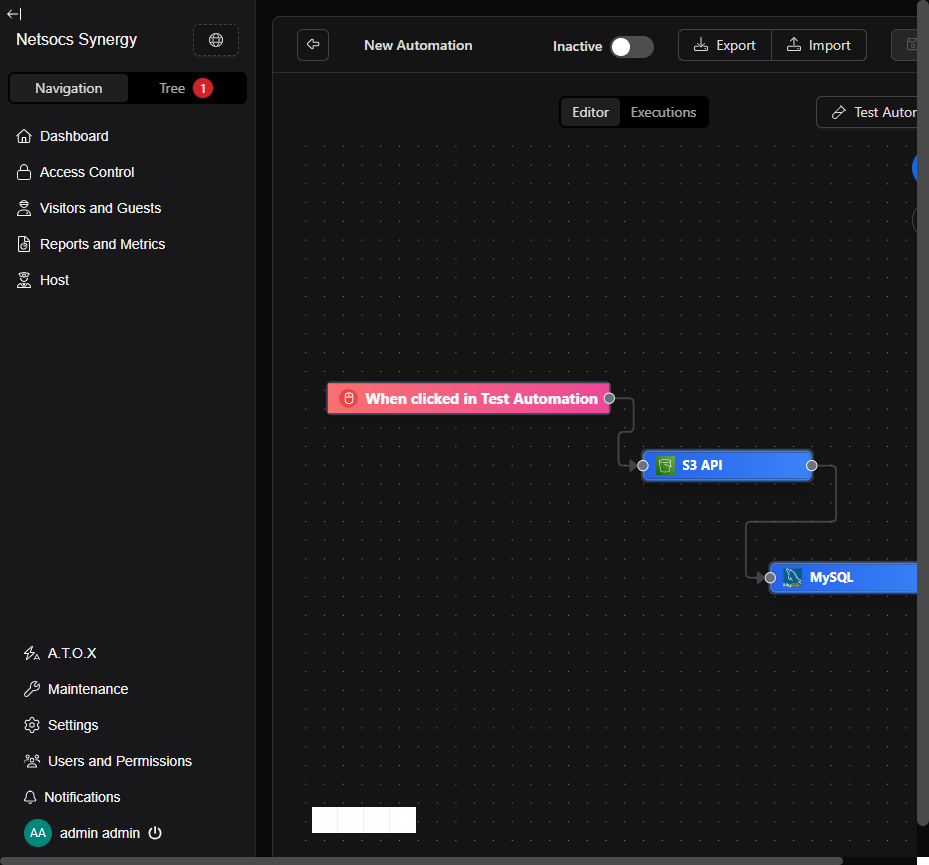
① Trigger that starts the flow · ② Previous node (example: S3 API) · ③ MySQL node — double-click to configure it
Configuration form
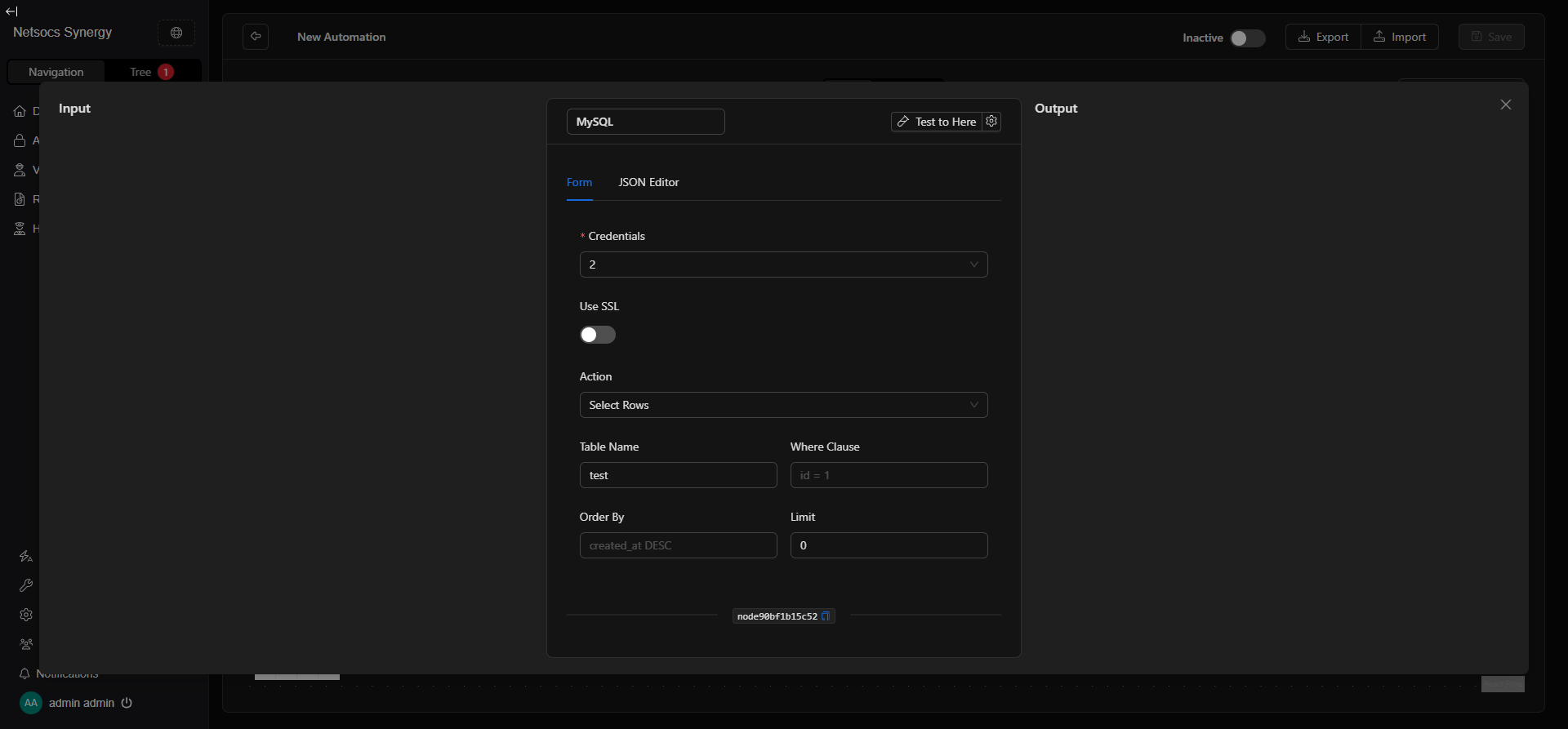
① MySQL credential selector (host, port, database, user, password) · ② SSL connection · ③ Action to execute · Cyan area: fields that change based on the selected action · Test to Here: test the node without running the full flow
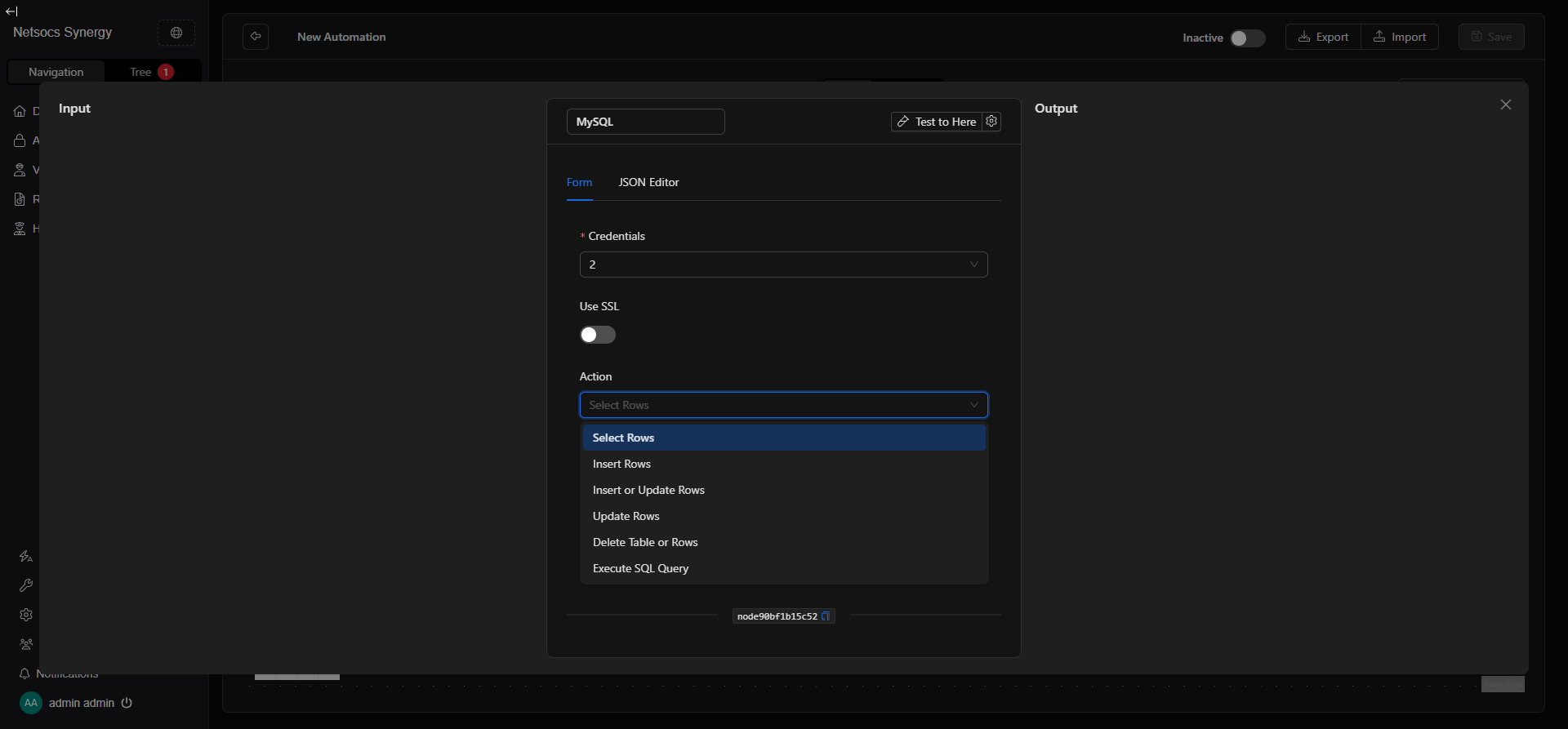
The 6 available actions
When to use it?
- When an automation must log alarms or events in a client's MySQL database.
- When you need to query an authorized access list to validate permissions within the flow.
- When you want to update a visit status (active, completed, rejected) in real time.
- When an audit flow requires inserting activity logs from cameras, sensors, or doors.
- When you need to sync data between NetSocs and an external system using MySQL (ERP, HR, legacy access control).
- When an AI node generated results that must be persisted in a table for later reporting.
- When you want to run a complex SQL query that doesn't fit the simple insert/update patterns.
When NOT to use it? If you only need to store temporary data within the flow, use the Set Memory node instead. If the database is PostgreSQL, MongoDB, or Redis, use the corresponding agent tool node.
How to configure it
Step 0) Open the parametrization panel
- On the canvas, double-click the MySQL node.
- A panel opens with two tabs: Form (recommended) and JSON Editor (for advanced users).
- The Test to Here button runs the flow up to this node without continuing to the next one — useful for verifying the connection and the returned data.
Step 1) Configure credentials
The node requires a MySQL credential that securely stores:
| Field | Description | Example |
|---|---|---|
| Host | IP or hostname of the MySQL server | 192.168.1.50 |
| Port | Server port (default: 3306) | 3306 |
| Database | Name of the database to connect to | netsocs_events |
| Username | User with permissions on the database | app_user |
| Password | User password | •••••••• |
- Use the credential selector to choose an existing credential or create a new one by clicking + New Credential.
- Credentials are stored encrypted and are reusable across multiple nodes.
Never enter credentials directly in the JSON Editor as plain text.
Step 2) Use SSL
Enable the Use SSL switch if your MySQL server requires an encrypted (TLS/SSL) connection.
| State | When to use it |
|---|---|
| Off | MySQL server on an internal network without SSL (typical on-premise) |
| On | MySQL server in the cloud (RDS, Cloud SQL, PlanetScale) or requiring TLS |
Step 3) Choose the action
The Action field defines what operation the node executes. Form fields change automatically based on the selected action.
| Action | What it does |
|---|---|
| Select Rows | Queries rows from a table with optional filters |
| Insert Rows | Inserts one or more new rows into a table |
| Insert or Update Rows | Upsert: inserts if not exists, updates if it does |
| Update Rows | Updates existing rows matching a condition |
| Delete Table or Rows | Deletes rows matching a condition, or the entire table |
| Execute SQL Query | Runs any manually written SQL query (advanced mode) |
Step 4) Fill in fields based on the action
Select Rows — Query rows
| Field | Description | Example |
|---|---|---|
| Table Name | Name of the table to query | alarm_events |
| Where Clause | SQL condition to filter rows (without the WHERE keyword) |
zone = 'north' AND active = 1 |
| Order By | Column and sort direction | created_at DESC |
| Limit | Maximum rows to return (0 = no limit) | 100 |
The response includes the
rowsarray with the matching records.
Insert Rows — Insert rows
| Field | Description | Example |
|---|---|---|
| Table Name | Name of the table to insert into | visits |
| Rows | JSON array with the objects to insert (one per row) | [{"name": "John", "zone": "north_access"}] |
The response includes
last_insert_idwith the ID of the last inserted record.
Insert or Update Rows — Upsert
| Field | Description | Example |
|---|---|---|
| Table Name | Name of the table | devices |
| Rows | JSON array with the objects to insert or update | [{"id": 5, "status": "online", "last_seen": "2024-01-01"}] |
Requires the table to have a primary key or unique index to determine whether to insert or update.
Update Rows — Update rows
| Field | Description | Example |
|---|---|---|
| Table Name | Name of the table | visits |
| Where | Condition to identify which rows to update | id = 42 |
| Set | JSON object with the new field values to apply | {"status": "completed", "exit_time": "2024-05-06 18:00"} |
The response includes
rows_affectedwith the number of modified rows.
Delete Table or Rows — Delete rows or table
| Field | Description | Example |
|---|---|---|
| Table Name | Name of the table | temp_logs |
| Where | Condition to filter which rows to delete (empty = all rows) | created_at < '2024-01-01' |
Danger: if you don't specify a Where condition, all rows in the table are deleted. In the JSON Editor,
drop_table: truedrops the entire table (irreversible).
Execute SQL Query — Free SQL
| Field | Description | Example |
|---|---|---|
| SQL Query | Complete SQL query to execute | SELECT zone, COUNT(*) as total FROM alarms GROUP BY zone |
Use this action only when the other options don't cover your use case. Any valid MySQL query is accepted.
Best practices
- Use least-privilege credentials: if the node only reads data, the credential doesn't need write or DDL permissions.
- Always specify Where in updates and deletes: an update or delete without a condition affects the entire table.
- Use Limit in Select Rows: on tables with thousands of records, an unlimited select can slow down the flow or exhaust memory.
- Test with "Test to Here" before activating the flow: verify the connection works and the query returns what you expect.
- For Insert or Update, ensure you have a primary key: without a unique index, upsert may insert duplicates.
- In Execute SQL Query, avoid destructive queries: prefer specific actions (Delete, Update) as they have field validations.
- Separate credentials per environment: use one credential for production and another for dev/testing.
- Enable SSL for cloud servers: RDS, Cloud SQL, and similar services usually require TLS.
Troubleshooting (common issues)
- "table_name is required for action 'select_rows'"
-
The Table Name field is empty. Fill it in with the exact table name before saving or testing.
-
Node fails with authentication error (Access denied)
- Verify that the username and password in the credential are correct.
- Make sure the user has permissions for the operation on that database:
GRANT SELECT ON db.* TO 'user'@'%'. -
Confirm that the MySQL server allows connections from the automation server's IP.
-
Node fails with "Can't connect" or timeout
- Verify that the Host and Port are correct and reachable from the automation server.
- Check that the installation's firewall allows traffic on port 3306 (or the configured port).
-
If the MySQL server is on the same network, try the internal IP instead of the hostname.
-
Select Rows returns an empty array but the table has data
- Review the Where Clause: it may be too restrictive or have a type mismatch comparison.
-
Verify the user has
SELECTpermissions on the specific table. -
Insert fails with "Duplicate entry"
- The table has a uniqueness constraint (PRIMARY KEY or UNIQUE) and you're trying to insert an already existing value.
-
Use Insert or Update Rows (upsert) to handle this case automatically.
-
Update modifies no rows (rows_affected: 0)
-
The Where condition doesn't match any records. Check the condition values.
-
Node fails with "SSL required" or similar
- Enable the Use SSL switch in the form.
Advanced configuration (JSON Editor) — expert users only
The JSON Editor tab lets you view and directly edit the complete node structure. Useful for copying configurations between flows.
Complete input structure
{
  "host": "/**$credential(\"host\", 2)**/",
  "port": "/**$credential(\"port\", 2)**/",
  "database": "/**$credential(\"database\", 2)**/",
  "username": "/**$credential(\"username\", 2)**/",
  "password": "/**$credential(\"password\", 2)**/",
  "use_ssl": false,
  "action": "select_rows",
  "table_name": "alarm_events",
  "where_clause": "zone = 'north'",
  "order_by": "created_at DESC",
  "limit": 50,
  "where": "",
  "rows": [],
  "set": {},
  "drop_table": false,
  "query": ""
}
All fields reference
| Field | Type | Required by | Description |
|---|---|---|---|
host |
string |
Always | Server IP/hostname (credential reference) |
port |
string |
Always | Server port (credential reference) |
database |
string |
Always | Database name (credential reference) |
username |
string |
Always | MySQL user (credential reference) |
password |
string |
Always | Password (credential reference) |
use_ssl |
boolean |
Optional | true for encrypted TLS/SSL connection |
action |
string |
Always | One of the 6 available actions |
table_name |
string |
All except execute_sql_query |
Name of the table to operate on |
where_clause |
string |
select_rows |
SQL condition without the WHERE keyword |
order_by |
string |
select_rows |
Column and sort direction |
limit |
number |
select_rows |
Maximum rows to return. 0 = no limit |
where |
string |
delete_table_or_rows, update_rows |
Filter condition for delete or update |
rows |
array |
insert_rows, insert_or_update_rows |
Array of objects with the data to insert |
set |
object |
update_rows |
Object with the fields and values to update |
drop_table |
boolean |
delete_table_or_rows |
true to drop the entire table (irreversible) |
query |
string |
execute_sql_query |
Complete SQL query to execute |
The fields
host,port,database,username, andpasswordare credential references when configured from the form. Do not put these values as plain text in the JSON.
Response structure
{
  "success": true,
  "rows_affected": 3,
  "rows": [
    { "id": 1, "zone": "north", "created_at": "2024-05-06 10:00:00" }
  ],
  "last_insert_id": 42
}
| Field | When it appears | Description |
|---|---|---|
success |
Always | true if the operation was successful |
rows |
select_rows, execute_sql_query |
Array with the returned records |
rows_affected |
insert_rows, update_rows, delete_* |
Number of rows affected by the operation |
last_insert_id |
insert_rows, insert_or_update_rows |
ID of the last inserted record |
JSON examples by use case
Query last 10 alarms from north zone
{
  "host": "/**$credential(\"host\", 2)**/",
  "port": "/**$credential(\"port\", 2)**/",
  "database": "/**$credential(\"database\", 2)**/",
  "username": "/**$credential(\"username\", 2)**/",
  "password": "/**$credential(\"password\", 2)**/",
  "use_ssl": false,
  "action": "select_rows",
  "table_name": "alarms",
  "where_clause": "zone = 'north' AND resolved = 0",
  "order_by": "created_at DESC",
  "limit": 10
}
Log an access denied event
{
  "host": "/**$credential(\"host\", 2)**/",
  "port": "/**$credential(\"port\", 2)**/",
  "database": "/**$credential(\"database\", 2)**/",
  "username": "/**$credential(\"username\", 2)**/",
  "password": "/**$credential(\"password\", 2)**/",
  "use_ssl": false,
  "action": "insert_rows",
  "table_name": "access_log",
  "rows": [
    {
      "person": "John Doe",
      "door": "main_entrance",
      "result": "denied",
      "reason": "expired_credential",
      "timestamp": "2024-05-06 14:32:00"
    }
  ]
}
Mark a visit as completed
{
  "host": "/**$credential(\"host\", 2)**/",
  "port": "/**$credential(\"port\", 2)**/",
  "database": "/**$credential(\"database\", 2)**/",
  "username": "/**$credential(\"username\", 2)**/",
  "password": "/**$credential(\"password\", 2)**/",
  "use_ssl": false,
  "action": "update_rows",
  "table_name": "visits",
  "where": "id = 42",
  "set": {
    "status": "completed",
    "exit_time": "2024-05-06 18:00:00"
  }
}
Clean up logs older than 2024
{
  "host": "/**$credential(\"host\", 2)**/",
  "port": "/**$credential(\"port\", 2)**/",
  "database": "/**$credential(\"database\", 2)**/",
  "username": "/**$credential(\"username\", 2)**/",
  "password": "/**$credential(\"password\", 2)**/",
  "use_ssl": false,
  "action": "delete_table_or_rows",
  "table_name": "system_logs",
  "where": "created_at < '2024-01-01'"
}
Alarms report by zone (free query)
{
  "host": "/**$credential(\"host\", 2)**/",
  "port": "/**$credential(\"port\", 2)**/",
  "database": "/**$credential(\"database\", 2)**/",
  "username": "/**$credential(\"username\", 2)**/",
  "password": "/**$credential(\"password\", 2)**/",
  "use_ssl": false,
  "action": "execute_sql_query",
  "query": "SELECT zone, COUNT(*) as total, MAX(created_at) as last_event FROM alarms WHERE resolved = 0 GROUP BY zone ORDER BY total DESC"
}
Quick guides (recipes)
Recipe A — "Log alarm when a sensor triggers"
- Trigger: sensor state changes to "alarm"
- Action:
Insert Rows - Table Name:
alarms - Rows:
[{"zone": "north", "sensor_id": "SEN-001", "type": "motion", "created_at": "{{timestamp}}"}] - Result: every sensor activation is recorded in the database with the timestamp and sensor data
Recipe B — "Check if a person has access before opening a door"
- Trigger: card or QR code read
- Action:
Select Rows - Table Name:
authorized_persons - Where Clause:
card_id = '{{card_id}}' AND active = 1 - Limit:
1 - Result: if
rowsreturns a record → continue to door-open node; if empty → deny access
Recipe C — "Sync device status with external system"
- Trigger: device state change in NetSocs
- Action:
Insert or Update Rows - Table Name:
devices_sync - Rows:
[{"device_id": "{{id}}", "status": "{{status}}", "last_updated": "{{timestamp}}"}] - Result: the status always reflects the latest value without creating duplicates
Recipe D — "Auto-close a visit when exit is detected"
- Trigger: exit event at main door
- Action:
Update Rows - Table Name:
visits - Where:
person_id = '{{id}}' AND status = 'active' - Set:
{"status": "closed", "exit_time": "{{timestamp}}"} - Result: the visit is closed in the database when the system detects physical exit
Recipe E — "Clean up AI processing temp records"
- Trigger: daily schedule at 3:00 AM
- Action:
Delete Table or Rows - Table Name:
ai_temp_results - Where:
created_at < DATE_SUB(NOW(), INTERVAL 7 DAY) - Result: records older than 7 days are automatically deleted without manual intervention
Recipe F — "Generate access report per shift"
- Trigger: schedule at end of each shift (6:00, 14:00, 22:00)
- Action:
Execute SQL Query - Query:
SELECT door, COUNT(*) as accesses, SUM(result = 'denied') as denied FROM access_log WHERE timestamp BETWEEN '{{shift_start}}' AND '{{shift_end}}' GROUP BY door - Result: the
rowsarray contains the shift summary, ready to send by email or save to S3
Internal references
- Node key:
mysql - Class:
action - Always required fields:
host,database,username,password,action - Required credential: type
mysql(host, port, database, username, password) - Default port:
3306 - SSL: optional, enable for cloud servers or servers requiring TLS
- Compatible databases: MySQL 5.7+, MySQL 8.x, MariaDB 10.x+, PlanetScale, Amazon RDS MySQL, Google Cloud SQL MySQL