Netsocs Template Language
The Netsocs Template Language is the Netsocs expression engine that lets you build dynamic values inside any text field. It is used in action configurations, event payloads, dashboard filters, and any field that supports templates.
Basic syntax
Expressions are written between double curly braces {{ }}. Anything outside the braces is treated as literal text.
{{expression}}
A single string can contain several expressions:
"Sensor {{sensor_id}} reports {{get_state(sensor_id)}}"
Key rule: A template with a single expression returns the native type of the result (number, boolean, object, array). A template with mixed text or multiple expressions always returns a
string.
Testing templates
In the playground you write the template directly in the TEMPLATE field (plain text, without wrapping it in JSON). Below, in CONTEXT, you define in JSON format the variables available to the template. The OUTPUT panel shows the result and its type in real time.
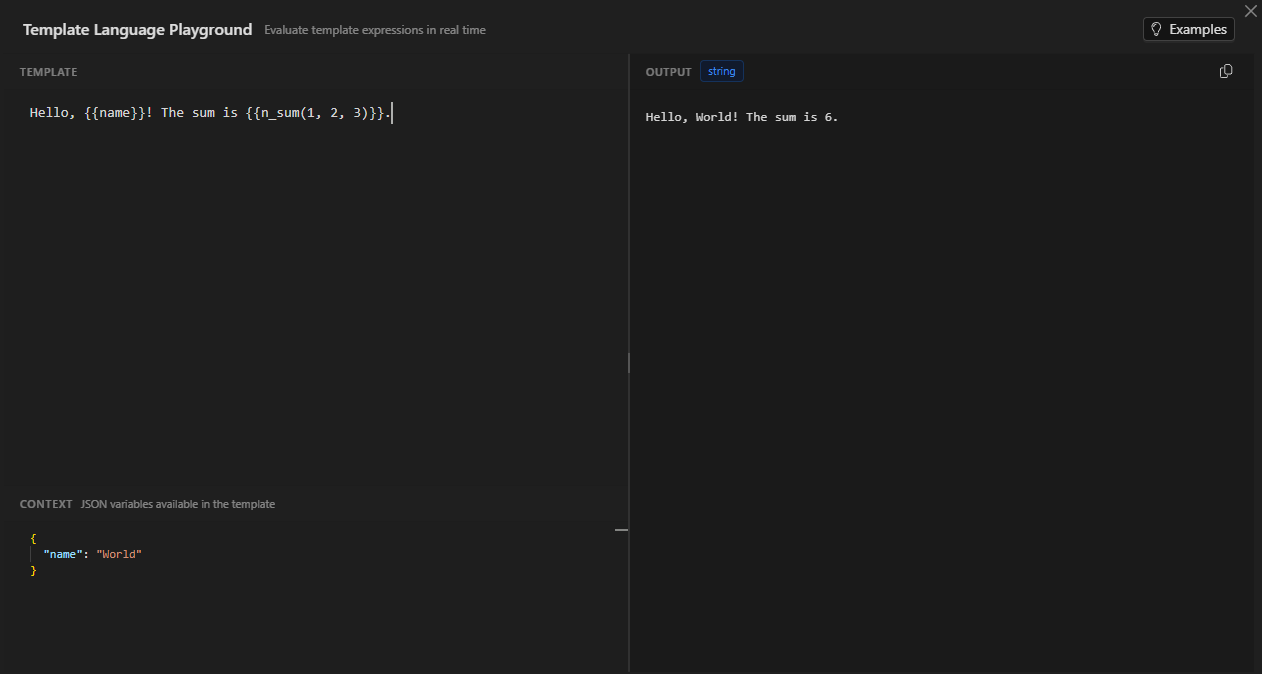
In the example shown in the image:
- TEMPLATE:
Hello, {{name}}! The sum is {{n_sum(1, 2, 3)}}. - CONTEXT:
{ "name": "World" } - OUTPUT:
Hello, World! The sum is 6.(typestring)
The context injects the variables available inside {{ }}. Built-in functions —both the Netsocs ones and the language-native ones— are always available without declaring anything in the context.
In the examples in this document the template is shown exactly as you write it in TEMPLATE; when an example needs variables, its JSON corresponds to the CONTEXT field.
Context variables
Variables passed in context are referenced directly by name inside {{ }}.
{
  "template": "{{name}} is {{age}} years old",
  "context": {
    "name": "Ana",
    "age": 30
  }
}
"Ana is 30 years old"
To access nested properties use a dot .:
{
  "template": "{{device.brand}}",
  "context": {
    "device": { "brand": "Hanwha", "model": "XNV-8080R" }
  }
}
"Hanwha"
Result types
| Type | Description | Template example |
|---|---|---|
string |
Text, or a mix of text + expression | "Hi {{name}}", "text" |
number |
Integer or decimal number | {{42}}, {{1 + 2.5}} |
boolean |
true or false |
{{5 > 3}} |
object |
JSON object | {{{ "k": "v" }}} |
array |
JSON array | {{[1, 2, 3]}} |
null |
Explicit null | (returned by empty functions) |
Operators
Arithmetic
| Operator | Description | Example | Result |
|---|---|---|---|
+ |
Addition | {{10 + 5}} |
15 |
- |
Subtraction | {{10 - 3}} |
7 |
* |
Multiplication | {{4 * 3}} |
12 |
/ |
Division | {{10 / 4}} |
2.5 |
% |
Modulo | {{10 % 3}} |
1 |
Comparison
| Operator | Example | Result |
|---|---|---|
== |
{{3 == 3}} |
true |
!= |
{{3 != 4}} |
true |
> |
{{5 > 3}} |
true |
< |
{{2 < 4}} |
true |
>= |
{{5 >= 5}} |
true |
<= |
{{4 <= 4}} |
true |
Logical
| Operator | Example | Result |
|---|---|---|
&& |
{{true && false}} |
false |
\|\| |
{{true \|\| false}} |
true |
! |
{{!true}} |
false |
Ternary
{{condition ? "value_if_true" : "value_if_false"}}
Example:
{{"Temperature " + (temperature > 30 ? "HIGH" : "normal")}}
With temperature = 35 → "Temperature HIGH"
Math functions
n_sum(...values) / n_suma(...values)
Sums all the arguments. Accepts numbers, numeric strings, and arrays.
{{n_sum(1, 2, 3)}}           → 6
{{n_sum(1, '2.5', 3)}}       → 6.5
{{n_sum([10, 20, 30])}}      → 60
{{n_suma(5, 10)}}            → 15   (Spanish alias)
Using context:
{
  "template": "{{n_sum(indoor_temp, outdoor_temp) / 2}}",
  "context": { "indoor_temp": 22, "outdoor_temp": 18 }
}
20
n_multiply(...values) / n_multiplicar(...values)
Multiplies all the arguments. Accepts numbers, numeric strings, and arrays.
{{n_multiply(2, 3, 4)}}      → 24
{{n_multiply(1.5, 2.0)}}     → 3
{{n_multiply([2, 5])}}       → 10
Unit conversion:
{
  "template": "{{n_multiply(voltage, current)}} W",
  "context": { "voltage": 220, "current": 2.5 }
}
"550 W"
n_abs(value)
Returns the absolute value.
{{n_abs(-15)}}    → 15
{{n_abs(7.3)}}    → 7.3
{{n_abs(-0.5)}}   → 0.5
add(a, b)
Adds two integers.
{{add(5, 3)}} → 8
To add more than two values or work with decimals, prefer
n_sum.
Numeric comparison functions
These functions are useful when values arrive as strings from an object's state (where "25.5" > "9" would fail with native operators).
n_less_than(a, b) / n_menor_que(a, b)
{{n_less_than(3, 5)}}         → true
{{n_less_than('9', '25.5')}}  → true   (compares numeric strings correctly)
{{n_less_than(5, 5)}}         → false
n_greater_than(a, b) / n_mayor_que(a, b)
{{n_greater_than(10, 3)}}     → true
{{n_greater_than(3, 10)}}     → false
n_less_equal_than(a, b) / n_menor_igual_que(a, b)
{{n_less_equal_than(5, 5)}}   → true
{{n_less_equal_than(6, 5)}}   → false
n_greater_equal_than(a, b) / n_mayor_igual_que(a, b)
{{n_greater_equal_than(5, 5)}}  → true
{{n_greater_equal_than(4, 5)}}  → false
n_equal(a, b) / n_igual(a, b)
Strict numeric comparison. Accepts numeric strings.
{{n_equal(1, 1)}}           → true
{{n_equal('1.5', 1.5)}}     → true
{{n_equal(1, 2)}}           → false
n_equal_epsilon(a, b, epsilon) / n_igual_epsilon(a, b, epsilon)
Compares whether two values are equal within a tolerance margin. Useful for noisy sensors.
{{n_equal_epsilon(25.001, 25.002, 0.01)}}   → true
{{n_equal_epsilon(25.0, 25.1, 0.01)}}       → false
Real example: Alert if the temperature deviates more than 0.5°C from the setpoint:
{
  "template": "{{n_not(n_equal_epsilon(current_temp, setpoint_temp, 0.5))}}",
  "context": { "current_temp": 22.8, "setpoint_temp": 22.0 }
}
true (deviation is greater than 0.5°C)
Logical functions
n_and(a, b)
Logical AND. Accepts booleans, strings ("true"/"false"/"1"/"0"/"on"/"off") and numbers.
{{n_and(true, true)}}       → true
{{n_and(true, false)}}      → false
{{n_and("1", "on")}}        → true
{{n_and(1, 0)}}             → false
n_or(a, b)
Logical OR with the same types as n_and.
{{n_or(true, false)}}       → true
{{n_or(false, false)}}      → false
{{n_or("0", "off")}}        → false
n_not(a)
Logical negation.
{{n_not(true)}}             → false
{{n_not(false)}}            → true
{{n_not("on")}}             → false
{{n_not(0)}}                → true
Combined example: Verify that a door is closed AND the alarm is armed:
{
  "template": "{{n_and(get_state_property('door.main', 'status'), get_state_property('alarm.zone1', 'armed'))}}",
  "context": {}
}
String functions
netconcat(a, b)
Concatenates two strings.
{{netconcat("sensor.", "001")}} → "sensor.001"
For concatenation with the native operator, you can use
+directly in the expression when both values are context strings.
letter_add(letter, amount) / sumar_letra(letter, amount)
Adds an integer to a letter, advancing in English alphabetical order, treating letters as a number in spreadsheet-column-style base 26 (A=1, B=2, …, Z=26, AA=27, AB=28, …). When passing Z, a new letter is prepended.
Preserves the case of the input: if the letter comes in lowercase, the result is returned in lowercase. amount accepts a number or a numeric string. If the result falls below A, it returns "".
{{letter_add("A", 2)}}      → "C"
{{letter_add("Z", 3)}}      → "AC"
{{letter_add("Z", 1)}}      → "AA"
{{letter_add("AZ", 1)}}     → "BA"
{{letter_add("a", 2)}}      → "c"     (lowercase in, lowercase out)
{{letter_add("A", "2")}}    → "C"     (amount as a string)
{{sumar_letra("A", 2)}}     → "C"     (Spanish alias)
Example - generate sequential column labels:
{
  "template": "Column: {{letter_add(col, offset)}}",
  "context": { "col": "A", "offset": 4 }
}
"Column: E"
Date and time functions
All date functions return strings in RFC3339 format ("2026-05-27T14:30:00Z"). The start_of_* and end_of_* functions use the server's local time.
n_now()
Current UTC timestamp.
{{n_now()}} → "2026-05-27T14:30:00Z"
minutes_ago(minutes)
Timestamp from N minutes ago (UTC).
{{minutes_ago(30)}}    → "2026-05-27T14:00:00Z"
{{minutes_ago(1440)}}  → (yesterday at the same time)
{{minutes_ago(-60)}}   → (in 60 minutes, a future value)
Use in an event filter:
{
  "template": "{{minutes_ago(60)}}",
  "context": {}
}
start_time in queries.
time_in_range(time, start, end [, offset]) / hora_en_rango(...)
Indicates (true/false) whether a time falls within the range [start, end], with inclusive bounds. Times are written as "HH:MM" (it also accepts "HH:MM:SS"; seconds are ignored).
- If
timeis""or"now", it uses the current time (the server works in UTC) adding the givenoffset, which corresponds to the country's time zone (e.g.-4,+2,-5; fractions such as-4.5are allowed). - The range supports midnight crossing: if
start > end(e.g.22:00–06:00), it is interpreted as spanning midnight.
{{time_in_range("15:32", "12:00", "16:00")}}   → true
{{time_in_range("16:01", "12:00", "16:00")}}   → false
{{time_in_range("12:00", "12:00", "16:00")}}   → true   (start inclusive)
{{time_in_range("16:00", "12:00", "16:00")}}   → true   (end inclusive)
{{time_in_range("23:00", "22:00", "06:00")}}   → true   (crosses midnight)
{{time_in_range("12:00", "22:00", "06:00")}}   → false
{{time_in_range("now", "08:00", "18:00", -4)}} → is the current time (UTC-4) within business hours?
{{hora_en_rango("15:32", "12:00", "16:00")}}   → true   (Spanish alias)
Example - enable an action only during the country's business hours (UTC-5):
{
  "template": "{{time_in_range(\"now\", \"08:00\", \"17:00\", -5)}}",
  "context": {}
}
Start-of-period functions
| Function | Description |
|---|---|
start_of_minute() |
Start of the current minute (seconds = 0) |
start_of_hour() |
Start of the current hour |
start_of_day() |
00:00:00 of the current day |
start_of_week() |
Monday 00:00:00 of the current week |
start_of_month() |
Day 1, 00:00:00 of the current month |
start_of_quarter() |
Start of the quarter (Jan/Apr/Jul/Oct) |
start_of_year() |
January 1, 00:00:00 of the current year |
{{start_of_day()}}      → "2026-05-27T00:00:00Z"
{{start_of_week()}}     → "2026-05-25T00:00:00Z"  (Monday)
{{start_of_month()}}    → "2026-05-01T00:00:00Z"
{{start_of_quarter()}}  → "2026-04-01T00:00:00Z"
{{start_of_year()}}     → "2026-01-01T00:00:00Z"
End-of-period functions
| Function | Description |
|---|---|
end_of_minute() |
End of the current minute (sec = 59.999…) |
end_of_hour() |
End of the current hour |
end_of_day() |
23:59:59.999… of the current day |
end_of_week() |
Sunday 23:59:59.999… of the current week |
end_of_month() |
Last second of the current month |
end_of_quarter() |
End of the quarter (Mar/Jun/Sep/Dec) |
end_of_year() |
December 31 23:59:59.999… of the current year |
{{end_of_day()}}      → "2026-05-27T23:59:59.999999999Z"
{{end_of_week()}}     → "2026-06-01T23:59:59.999999999Z"  (Sunday)
{{end_of_month()}}    → "2026-05-31T23:59:59.999999999Z"
{{end_of_year()}}     → "2026-12-31T23:59:59.999999999Z"
Example - current month range:
{
  "template": "{{[start_of_month(), end_of_month()]}}",
  "context": {}
}
["2026-05-01T00:00:00Z", "2026-05-31T23:59:59.999999999Z"] (type array)
Object access functions
These functions query the state of objects on the Netsocs platform in real time.
get_state(objectId)
Returns the object's main state as a string.
{{get_state("hikvision.camera.ch1")}}   → "online"
{{get_state("door.main.lock")}}         → "locked"
Example: Generate a dynamic message:
{
  "template": "The camera is: {{get_state('hikvision.camera.ch1')}}",
  "context": {}
}
get_state_property(objectId, property)
Returns the value of a specific property from the object's additional state.
{{get_state_property("sensor.temp.001", "temperature")}}  → "23.5"
{{get_state_property("camera.001", "recording")}}         → "true"
Example - compute a temperature difference:
{
  "template": "{{n_sum(get_state_property('sensor.interior', 'temp'), '-', get_state_property('sensor.exterior', 'temp'))}}",
  "context": {}
}
get_object_state(objectId)
Returns the full StateChangeRecord object with all the data from the latest state.
{{get_object_state("sensor.001")}}
Allows access to record fields:
{{get_object_state("sensor.001").State}}
{{get_object_state("sensor.001").CreatedAt}}
get_object_by_id(objectId)
Returns the full object (metadata + configuration).
{{get_object_by_id("camera.001").Name}}
{{get_object_by_id("camera.001").Domain}}
get_objects_by_ids(ids)
Returns an array of objects. Accepts a comma-separated list, an array, or an array from the context. Maximum 1000 IDs.
{
  "template": "{{get_objects_by_ids(camera_ids)}}",
  "context": {
    "camera_ids": ["camera.001", "camera.002", "camera.003"]
  }
}
It also accepts a string with comma-separated IDs:
{{get_objects_by_ids("camera.001,camera.002")}}
get_objectids_where_state(state)
Returns an array of IDs of all objects that have the given state.
{{get_objectids_where_state("online")}}   → ["camera.001", "camera.003", "sensor.002"]
{{get_objectids_where_state("alarm")}}    → ["zone.1", "zone.3"]
Example - count online cameras:
{
  "template": "{{n_sum(get_objectids_where_state('online'))}}",
  "context": {}
}
Note:
n_sumover an array of non-numeric strings returns 0. To count, prefercount_objects_by_prop.
get_objectids_where_property(property, value)
Returns an array of IDs of objects where a state property has exactly the given value.
{{get_objectids_where_property("zone", "A")}}
{{get_objectids_where_property("model", "XNV-8080R")}}
get_first_objectid_where_property(property, value)
Returns the ID of the first object that meets the condition. Useful when a single result is expected.
{{get_first_objectid_where_property("serial_number", "SN-123456")}}
→ "hanwha.camera.main"
count_objects_by_prop(property, condition, value [, domain])
Counts objects whose additional state meets a condition. The only condition currently supported is "eq" (equal).
count_objects_by_prop(property, "eq", value)
count_objects_by_prop(property, "eq", value, domain)
Examples:
{{count_objects_by_prop("status", "eq", "open")}}
→ 5   (5 objects have status = "open")

{{count_objects_by_prop("recording", "eq", "true", "cameras")}}
→ 3   (3 objects in the "cameras" domain have recording = "true")
Dashboard example:
{
  "template": "Open doors: {{count_objects_by_prop('status', 'eq', 'open', 'access.doors')}}",
  "context": {}
}
Event function
get_total_events(eventTypes [, objectsId [, domains [, startTime, endTime]]])
Counts events that match the given filters. All parameters are comma-separated strings when there are multiple values.
Parameters:
| Parameter | Type | Description |
|---|---|---|
eventTypes |
string | Comma-separated event types |
objectsId |
string | Comma-separated object IDs (optional) |
domains |
string | Comma-separated domains (optional) |
startTime |
string | Start date RFC3339 or YYYY-MM-DD:HH:MM:SS |
endTime |
string | End date RFC3339 or YYYY-MM-DD:HH:MM:SS |
Examples:
Count all motion events for the day:
{
  "template": "{{get_total_events('motion_detected', '', '', start_of_day(), end_of_day())}}",
  "context": {}
}
Count events from a specific camera in the last hour:
{
  "template": "{{get_total_events('motion_detected,tamper', 'hanwha.camera.001', '', minutes_ago(60), n_now())}}",
  "context": {}
}
Count this month's alarms in a domain:
{
  "template": "{{get_total_events('alarm_triggered', '', 'security.zones', start_of_month(), end_of_month())}}",
  "context": {}
}
Data types in expressions
JSON objects
You can build an object directly in the expression:
{{{"name": "sensor1", "value": 42}}}
{"name":"sensor1","value":42} (type object)
Access properties of inline objects:
{{{"greeting": "hi"}.greeting}} → "hi"
JSON arrays
{{[1, 2, 3, 4, 5]}}   → [1,2,3,4,5] (type `array`)
{{["cam1", "cam2"]}}  → ["cam1","cam2"]
Dates with date() and duration()
The underlying library (expr-lang) provides native functions to compare dates:
{{date("2026-01-01T00:00:00Z") < date("2026-12-31T00:00:00Z")}}   → true

{{date(start_date) - date(end_date) < duration("24h")}}
With context:
{
  "template": "{{(date(request.Time) - date(resource.Age) < duration(\"24h\")) ? \"recent\" : \"old\"}}",
  "context": {
    "request": { "Time": "2026-05-27T23:59:00Z" },
    "resource": { "Age": "2026-05-27T00:00:00Z" }
  }
}
"recent"
Base language (expr-lang)
In addition to the Netsocs functions described above, the entire base language is available inside {{ }}, with its operators and a broad set of built-in functions. Everything in this section is written the same way: inside double braces in the playground.
Literals
| Type | Examples |
|---|---|
| Comment | /* ... */ or // ... |
| Boolean | true, false |
| Integer | 42, 0x2A (hex), 0o52 (octal), 0b101010 (binary) |
| Decimal | 0.5, .5 |
| String | "foo", 'bar' |
| Multiline string | `text on\nmultiple lines` (backticks, no escapes) |
| Array | [1, 2, 3] |
| Map (object) | {a: 1, b: 2} |
| Null | nil |
Strings with double/single quotes support escapes: \n, \t, \uXXXX.
Operators
| Category | Operators |
|---|---|
| Arithmetic | +, -, *, /, % (modulo), ^ or ** (power) |
| Comparison | ==, !=, <, >, <=, >= |
| Logical | not or !, and or &&, or or \|\| |
| Conditional | ?: (ternary), ?? (null coalescing) |
| Membership | [], ., ?., in |
| String | + (concatenate), contains, startsWith, endsWith |
| Regex | matches |
| Range | .. |
| Slice | [:] |
| Pipe | \| |
{{2 ^ 10}}                          → 1024
{{"a" in ["a", "b"]}}               → true
{{"name" in {"name": "x"}}}         → true
{{"hello" contains "ell"}}          → true
{{"camera.001" startsWith "cam"}}   → true
{{"sensor.temp" endsWith ".temp"}}  → true
{{"abc123" matches "[a-z]+[0-9]+"}} → true
{{1..3}}                            → [1, 2, 3]
Access and indices
Fields are accessed with . or [] (equivalent). Negative indices count from the end.
{{device.brand}}        equivalent to   {{device["brand"]}}
{{array[0]}}            → first element
{{array[-1]}}           → last element
Slices [:]
With array = [1, 2, 3, 4, 5]:
{{array[1:4]}}   → [2, 3, 4]
{{array[:3]}}    → [1, 2, 3]
{{array[3:]}}    → [4, 5]
Optional chaining ?. and coalescing ??
?. avoids errors if an intermediate value is nil (returns nil); ?? returns the right-hand side when the left is nil.
{{person?.address?.city}}
{{person?.name ?? "Anonymous"}}
Pipe operator |
Passes the result of the left side as the first argument of the right side.
{{name | lower() | split(" ")}} equivalent to {{split(lower(name), " ")}}
Variables (let)
You can declare temporary variables with let, separating statements with ;.
{{let x = 42; x * 2}}                → 84
{{let a = 10; let b = 5; a + b}}     → 15
$env
$env is a map with all the context variables. Useful for names with spaces or to check whether a variable exists.
{{'temperature' in $env}}            → true if the context carries "temperature"
{{$env["var with spaces"]}}
Predicates
Functions like filter, map, all, any, etc. take a predicate: an expression where # is the current element. If the element is an object, you can omit # and use .Field directly.
{{filter(0..9, # % 2 == 0)}}             → [0, 2, 4, 6, 8]
{{filter(cameras, .state == "online")}}
{{map(sensors, .temperature)}}
String functions (base)
{{trim("  Hi  ")}}                         → "Hi"
{{trim("__Hi__", "_")}}                    → "Hi"
{{trimPrefix("HelloWorld", "Hello")}}      → "World"
{{trimSuffix("HelloWorld", "World")}}      → "Hello"
{{upper("hi")}}                            → "HI"
{{lower("HI")}}                            → "hi"
{{split("a,b,c", ",")}}                    → ["a", "b", "c"]
{{splitAfter("a,b,c", ",")}}               → ["a,", "b,", "c"]
{{replace("Hello World", "World", "All")}} → "Hello All"
{{repeat("ab", 3)}}                        → "ababab"
{{indexOf("sensor.001", ".")}}             → 6
{{lastIndexOf("a.b.c", ".")}}              → 3
{{hasPrefix("cam.1", "cam")}}              → true
{{hasSuffix("cam.1", ".1")}}               → true
Numeric functions (base)
{{max(5, 7)}}      → 7
{{min(5, 7)}}      → 5
{{abs(-5)}}        → 5
{{ceil(1.5)}}      → 2
{{floor(1.5)}}     → 1
{{round(1.5)}}     → 2
For sums/multiplications/comparisons that tolerate numeric strings from state, prefer the Netsocs functions
n_sum,n_multiply,n_greater_than, etc.
Array functions (base)
{{all([2, 4, 6], # % 2 == 0)}}        → true
{{any([1, 2, 3], # > 2)}}             → true
{{one([1, 2, 3], # == 2)}}            → true
{{none([1, 2, 3], # > 5)}}            → true
{{map([1, 2, 3], # * 2)}}             → [2, 4, 6]
{{filter([1, 2, 3, 4], # > 2)}}       → [3, 4]
{{find([1, 2, 3, 4], # > 2)}}         → 3
{{findIndex([1, 2, 3, 4], # > 2)}}    → 2
{{findLast([1, 2, 3, 4], # > 2)}}     → 4
{{findLastIndex([1, 2, 3, 4], # > 2)}}→ 3
{{count([1, 2, 3, 4], # > 2)}}        → 2
{{count([true, false, true])}}        → 2
{{concat([1, 2], [3, 4])}}            → [1, 2, 3, 4]
{{flatten([1, [2, [3]]])}}            → [1, 2, 3]
{{uniq([1, 2, 2, 3])}}                → [1, 2, 3]
{{join(["a", "b", "c"], ",")}}        → "a,b,c"
{{reduce(1..4, #acc + #, 0)}}         → 10
{{sum([1, 2, 3])}}                    → 6
{{mean([1, 2, 3])}}                   → 2
{{median([1, 2, 3])}}                 → 2
{{first([1, 2, 3])}}                  → 1
{{last([1, 2, 3])}}                   → 3
{{take([1, 2, 3, 4], 2)}}             → [1, 2]
{{reverse([3, 1, 4])}}                → [4, 1, 3]
{{sort([3, 1, 4])}}                   → [1, 3, 4]
{{sort([3, 1, 4], "desc")}}           → [4, 3, 1]
{{sortBy(users, .age)}}
{{sortBy(users, .age, "desc")}}
{{groupBy(users, .age)}}
In reduce, the predicate has access to # (current element), #acc (accumulator) and #index (index).
Map functions (base)
{{keys({"name": "John", "age": 30})}}    → ["name", "age"]
{{values({"name": "John", "age": 30})}}  → ["John", 30]
{{toPairs({"a": 1, "b": 2})}}            → [["a", 1], ["b", 2]]
{{fromPairs([["a", 1], ["b", 2]])}}      → {"a": 1, "b": 2}
Type conversion (base)
{{type(42)}}                  → "int"
{{type("hi")}}               → "string"
{{int("123")}}               → 123
{{float("123.45")}}          → 123.45
{{string(123)}}              → "123"
{{toJSON({"a": 1})}}         → "{\"a\":1}"
{{fromJSON("{\"a\":1}")}}    → {"a": 1}
{{toBase64("Hi")}}           → "SGk="
{{fromBase64("SGk=")}}       → "Hi"
Miscellaneous (base)
{{len([1, 2, 3])}}                       → 3
{{len("Hi")}}                            → 2
{{get([10, 20, 30], 1)}}                 → 20
{{get({"name": "John"}, "name")}}        → "John"
Bit functions (base)
{{bitand(0b1010, 0b1100)}}   → 8     (0b1000)
{{bitor(0b1010, 0b1100)}}    → 14    (0b1110)
{{bitxor(0b1010, 0b1100)}}   → 6     (0b110)
{{bitnand(0b1010, 0b1100)}}  → 2
{{bitnot(0b1010)}}           → -11
{{bitshl(0b1011, 2)}}        → 44
{{bitshr(0b1011, 2)}}        → 2
Complete examples
1. Camera status with a state label
{
  "template": "Camera {{cam_id}}: {{get_state(cam_id) == 'online' ? 'ACTIVE' : 'INACTIVE'}}",
  "context": { "cam_id": "hanwha.camera.lobby" }
}
2. Check whether a temperature is within range
{
  "template": "{{n_and(n_greater_equal_than(get_state_property('sensor.temp', 'value'), '18'), n_less_equal_than(get_state_property('sensor.temp', 'value'), '26'))}}",
  "context": {}
}
true if the temperature is between 18 and 26.
3. Dynamic payload for a driver action
{
  "template": "{\"camera_id\": \"{{camera_id}}\", \"recording\": true, \"start_time\": \"{{start_of_day()}}\", \"end_time\": \"{{end_of_day()}}\"}",
  "context": { "camera_id": "cam.001" }
}
4. Daily event summary
{
  "template": "Today: {{get_total_events('motion_detected', '', 'cameras', start_of_day(), end_of_day())}} motions, {{get_total_events('alarm_triggered', '', '', start_of_day(), end_of_day())}} alarms",
  "context": {}
}
5. Get the IDs of cameras in alarm and build a payload
{
  "template": "{{get_objectids_where_state('alarm')}}",
  "context": {}
}
array) ready to use in another field.
6. Compute the average of two sensors
{
  "template": "{{n_sum(get_state_property('sensor.north', 'temp'), get_state_property('sensor.south', 'temp')) / 2}} °C",
  "context": {}
}
7. Number of online devices in a specific domain
{
  "template": "Active cameras: {{count_objects_by_prop('connection_status', 'eq', 'connected', 'cameras')}}",
  "context": {}
}
8. Check whether a device reported recently
{
  "template": "{{date(get_state_property('sensor.001', 'last_seen')) > date(minutes_ago(10))}}",
  "context": {}
}
true if the sensor reported in the last 10 minutes.
Access control functions
These functions query, in real time, the data of people registered in the access control module.
get_person(personId)
Returns the full object for a person given their ID. Returns an empty object if the ID does not exist or is blank.
Available fields:
| Field | Type | Description |
|---|---|---|
ID |
string | The person's UUID |
ExternalID |
string | External ID (e.g. employee number) |
Name |
string | Full name |
Photo |
string | Photo URL |
PersonType |
string | "employee", "visitor", "contractor" |
ActivationDate |
string / null | Activation date (RFC3339) |
ExpirationDate |
string / null | Expiration date (RFC3339) |
Timezone |
string | Time zone (default "UTC") |
Enabled |
bool | Whether the person is enabled |
CustomFields |
object | Custom fields {"key": "value"} |
APBExempt |
bool | Exempt from anti-passback |
ExtendedUnlock |
bool | Extended unlock time |
EscortRequired |
bool | Requires an escort |
TenantID |
string | Tenant ID |
CreatedAt |
string | Creation date (RFC3339) |
UpdatedAt |
string | Last update date (RFC3339) |
Examples:
Get a person's name:
{{get_person("abc-123-uuid").Name}} → "María García"
Check whether a person is enabled:
{{get_person("abc-123-uuid").Enabled}} → true
Use the person type in conditional logic:
{
  "template": "{{get_person(person_id).PersonType == 'visitor' ? 'Limited access' : 'Full access'}}",
  "context": { "person_id": "abc-123-uuid" }
}
Build a payload enriched with cardholder data:
{
  "template": "{\"name\": \"{{get_person(person_id).Name}}\", \"type\": \"{{get_person(person_id).PersonType}}\", \"enabled\": {{get_person(person_id).Enabled}}}",
  "context": { "person_id": "abc-123-uuid" }
}
Access a custom field:
{
  "template": "Department: {{get_person(person_id).CustomFields.department}}",
  "context": { "person_id": "abc-123-uuid" }
}
get_person_location(personId)
Returns a person's current location: whether they are inside, in which area, when they were last seen, and through which reader.
Available fields:
| Field | Type | Description |
|---|---|---|
PersonID |
string | The person's ID |
IsInside |
bool | true if the person is inside the area |
AreaID |
string | ID of the area where they were last seen |
LastReaderID |
string | ID of the reader they passed through |
LastSeenAt |
string / null | Timestamp of last sighting (RFC3339) |
LastDirection |
string | "entry" or "exit" |
TenantID |
string | Tenant ID |
UpdatedAt |
string | Last update of the record |
Examples:
Check whether a person is inside:
{{get_person_location("abc-123-uuid").IsInside}} → true
Get the area where a person is:
{{get_person_location("abc-123-uuid").AreaID}} → "building.entrance.lobby"
Dynamic message with presence status:
{
  "template": "{{get_person(person_id).Name}} is {{get_person_location(person_id).IsInside ? 'inside' : 'outside'}} the building",
  "context": { "person_id": "abc-123-uuid" }
}
"María García is inside the building"
Check the last direction of passage:
{
  "template": "{{get_person_location(person_id).LastDirection == 'entry' ? 'Entered' : 'Exited'}} through {{get_person_location(person_id).LastReaderID}}",
  "context": { "person_id": "abc-123-uuid" }
}
Quick function reference
| Function | Returns | Description |
|---|---|---|
n_sum(...) |
number |
Sum of values/array |
n_suma(...) |
number |
Spanish alias of n_sum |
n_multiply(...) |
number |
Product of values/array |
n_multiplicar(...) |
number |
Spanish alias of n_multiply |
n_abs(a) |
number |
Absolute value |
add(a, b) |
number |
Sum of two integers |
n_less_than(a, b) |
boolean |
a < b numeric |
n_menor_que(a, b) |
boolean |
Alias of n_less_than |
n_greater_than(a, b) |
boolean |
a > b numeric |
n_mayor_que(a, b) |
boolean |
Alias of n_greater_than |
n_less_equal_than(a, b) |
boolean |
a <= b numeric |
n_menor_igual_que(a, b) |
boolean |
Alias of n_less_equal_than |
n_greater_equal_than(a, b) |
boolean |
a >= b numeric |
n_mayor_igual_que(a, b) |
boolean |
Alias of n_greater_equal_than |
n_equal(a, b) |
boolean |
a == b numeric |
n_igual(a, b) |
boolean |
Alias of n_equal |
n_equal_epsilon(a, b, ε) |
boolean |
\|a - b\| <= ε |
n_igual_epsilon(a, b, ε) |
boolean |
Alias of n_equal_epsilon |
n_and(a, b) |
boolean |
Logical AND |
n_or(a, b) |
boolean |
Logical OR |
n_not(a) |
boolean |
Logical NOT |
netconcat(a, b) |
string |
Concatenates two strings |
letter_add(letter, n) |
string |
Adds n to a letter in base-26 (A+2=C, Z+3=AC) |
sumar_letra(letter, n) |
string |
Spanish alias of letter_add |
n_now() |
string |
Current UTC timestamp |
minutes_ago(n) |
string |
Timestamp from N minutes ago |
time_in_range(time, start, end [, offset]) |
boolean |
Is time within [start, end]? ("now"+offset = current time; supports midnight crossing) |
hora_en_rango(...) |
boolean |
Spanish alias of time_in_range |
start_of_minute() |
string |
Start of the current minute |
start_of_hour() |
string |
Start of the current hour |
start_of_day() |
string |
Start of the current day |
start_of_week() |
string |
Start of the week (Monday) |
start_of_month() |
string |
Start of the current month |
start_of_quarter() |
string |
Start of the quarter |
start_of_year() |
string |
Start of the current year |
end_of_minute() |
string |
End of the current minute |
end_of_hour() |
string |
End of the current hour |
end_of_day() |
string |
End of the current day |
end_of_week() |
string |
End of the week (Sunday) |
end_of_month() |
string |
End of the current month |
end_of_quarter() |
string |
End of the quarter |
end_of_year() |
string |
End of the current year |
get_state(id) |
string |
Object's main state |
get_state_property(id, prop) |
string |
Property of the additional state |
get_object_state(id) |
object |
Full state record |
get_object_by_id(id) |
object |
Full object |
get_objects_by_ids(ids) |
array |
List of objects by IDs |
get_objectids_where_state(state) |
array |
IDs with that state |
get_objectids_where_property(prop, val) |
array |
IDs where property = value |
get_first_objectid_where_property(prop, val) |
string |
First matching ID |
count_objects_by_prop(prop, cond, val [, domain]) |
number |
Counts objects |
get_total_events(types [, ids [, domains [, start, end]]]) |
number |
Counts events |
get_person(personId) |
object |
Full data of a person by ID |
get_person_location(personId) |
object |
Current location of a person |