Documentation: Iterate Items Node
Overview
The Iterate Items Node is a flow control node that traverses a list of elements and executes a branch of the flow once per element (loop / for-each). When it finishes traversing all elements, it executes a separate completion branch.
It is the fundamental tool for applying the same logic to a dynamic set of elements: for example, iterating over all sensors returned by a Get Object node and sending a notification or executing an action on each one.
When to use this node?
Use this node when you need to:
- Repeat an action for each element in a list (for example, send an alert for each sensor in alarm state).
- Process the output of a Get Object node (which returns an array) element by element.
- Execute a block of logic a specific number of times (by passing a number as input).
- Traverse data coming from a webhook, a database query, or an HTTP response.
Output Branches (Node outputs)
Unlike most action nodes, the Iterate Items node has two distinct output branches on the canvas:
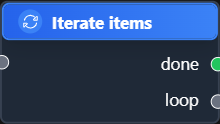
loop: Executes once per element in the list. Connect to this output the logic you want to repeat (the action to apply to each element). Within this branch you can access the current element of the iteration.done: Executes only once, when the iteration has finished traversing all elements. Connect here the logic that should occur when the loop finishes (for example, a summary or a final notification).
TIP: The typical pattern is: the
loopbranch performs the individual action and re-enters the cycle; thedonebranch continues the main flow when there are no more elements to process.
Node Configuration
The node configuration consists of a single text field where you define the list of elements to iterate over.
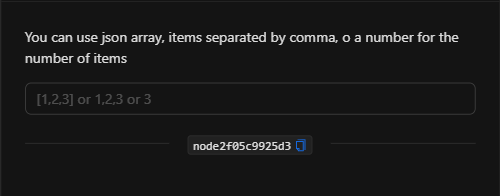
Items
Accepts three forms of input, as the node itself indicates ("You can use json array, items separated by comma, or a number for the number of items"):
- JSON array: A list in JSON format, for example
["sensor_a","sensor_b","sensor_c"]or[1,2,3]. - Comma-separated items: A string with comma-separated values, for example
1,2,3. - A number: An integer that indicates how many times to repeat the cycle, for example
3(iterates 3 times).
This field supports template expressions, so its most powerful use is referencing the output of a previous node, for example {{get_object_node}} to iterate over the objects found by a Get Object node.
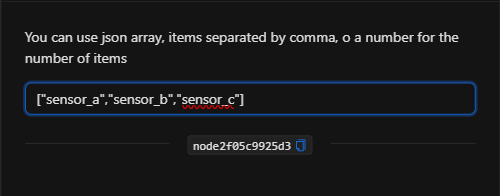
JSON Structure (Input Parameters)
The node configuration reduces to a single items text field:
{
  "items": "[\"sensor_a\",\"sensor_b\",\"sensor_c\"]"
}
JSON Fields
| Field | Type | Description |
|---|---|---|
items |
string | The list to iterate over. Can be a JSON array ([...]), comma-separated values (a,b,c), or a number (3). Supports template expressions for referencing previous node outputs. |
Output: the current element of the iteration
On each loop iteration (the loop branch), the node exposes the current element of the iteration, which can be referenced by nodes connected to the loop branch via the node's key:
{{node_key}}
If the element is an object (for example, coming from a Get Object node), you can access its properties directly:
{{node_key.object_id}}
{{node_key.state_additional_properties.temperature}}
(Remember to replace node_key with the key automatically assigned to the node on the canvas.)
Usage Examples
Example 1: Notify for each sensor above the threshold
Use case: A Get Object node retrieves all sensors with temperature above the threshold. The Iterate Items node traverses that list and, for each sensor (loop branch), sends a notification. When finished (done branch), it records a summary event.
- Items:
{{get_object_node}}(the output of the Get Object node) loopbranch → Notification node using{{iterate_node.object_id}}.donebranch → Dispatch event node "Temperature review completed".
Example 2: Repeat an action a fixed number of times
Use case: Execute an action 3 times (for example, retry an operation or generate 3 spaced captures).
- Items:
3 loopbranch → The action to repeat.
Configuration JSON:
{
  "items": "3"
}
Validation and Errors
| Condition / Common cause / fix |
| :--- | :--- |
| The loop does not execute | The items field is empty or the resulting list has no elements. Verify the value or template expression. |
| Invalid list format | If using JSON, make sure the array is well-formed (correct quotes and brackets). |
| The done branch is never reached | Make sure the logic inside the loop branch does not get blocked or stuck waiting indefinitely. |
Best Practices
- Connect both branches intentionally: Use
loopfor the repetitive action anddonefor the closing logic. Do not forget to connect thedonebranch if you need to continue the flow after the iteration. - Combine with Get Object: The Get Object → Iterate Items → action pattern is the standard way to apply logic to dynamic sets of devices.
- Name the node descriptively: Change the node name on the canvas (e.g., "For each sensor") so that the
{{node_key}}references are clear. - Mind the volume: If the list can be very large, consider limiting the results beforehand (using the
limitin the Get Object node) to avoid excessively long cycles.