Monitoring center operation manual
This section answers the basic questions about how Netsocs Synergy is operated during a shift: what you look at, what it means, and what you do about it.
This is not a configuration guide. It assumes someone has already installed the platform, registered the devices and built the dashboards. What follows is the work of the shift operator and of the supervisor who reviews how each alert was handled.
The monitoring station
A typical station has at least two things on screen: the live video from the cameras you are watching and the event log, the list of everything the platform detects in real time.
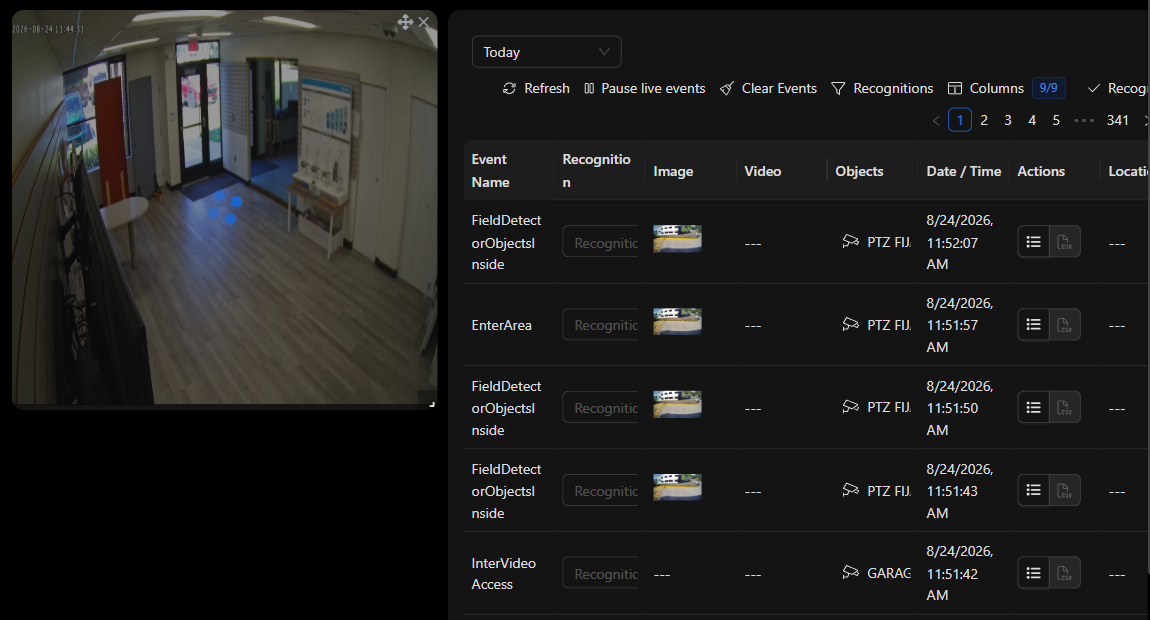
Everything else — the sound that alerts you, the carousel that rotates dashboards on the video wall, recorded video playback — revolves around those two elements.
The path of an alert
Almost everything an operator does during a shift follows this same path:
| # | What happens | Where |
|---|---|---|
| 1 | An alert sounds and a new row appears | The event log, with the audio of the event type |
| 2 | You look at what it is and which object it came from | The event row and its detail |
| 3 | You open the camera for that area to see what is happening right now | The live video widget |
| 4 | You review the recording of the preceding seconds | Playback mode |
| 5 | You recognize the event to record that it was handled | The recognition column of the log |
The six chapters of this manual cover each leg of that path.
The six core topics
| Chapter | Answers the question |
|---|---|
| Filtering the event log | How do I see only what matters to me instead of hundreds of events per hour? |
| Sounds and events | Why does the platform make a sound, how is it configured, and why does it sometimes stay silent? |
| Dashboard carousel | How do I make the video wall rotate between several dashboards on its own? |
| Viewing live cameras | How do I put a camera on screen, move it and capture an image? |
| Reviewing recorded video | How do I see what happened a while ago and take the evidence with me? |
| Handling an event end to end | The complete procedure, from the sound to the recognition |
Before you start
- Your user needs permissions on the modules you are going to use (dashboard, event log, live video, playback). If a section does not show up or comes up empty, it is almost always a missing permission: see Creating users, policies and permissions.
- The dashboard for your station should already be built. If you need to create or modify one, see Dashboards.
- Event logs are created once and reused. To build a new one, see Create a custom Event Log.
TIP: If you are a supervisor preparing the station for your team, the chapter Handling an event end to end is meant to be printed and left in plain sight at the workstation.