Documentation: Speaker Play Audio Node
Overview
The Speaker Play Audio Node is an action node from the Communication family that plays an audio file on one or more speaker objects registered on the platform (for example, speakers built into ONVIF cameras or IP audio devices).
In IoT, security, and industrial environments it is the ideal channel for automatic audio messages: broadcasting an evacuation message when a fire alarm triggers, playing a deterrent warning when an intrusion is detected in a restricted area, or announcing operational notices on a factory floor.
When to use this node?
Use this node when you need to:
- Play a message or alert tone on field speakers in response to an event (alarm, intrusion, incident).
- Broadcast deterrent warnings in real time (for example, when motion is detected outside working hours).
- Deliver operational announcements scheduled or triggered by an automation.
- Play the same audio on multiple speakers simultaneously as part of a response protocol.
Node Configuration
The node has two configuration tabs: Form and JSON Editor.
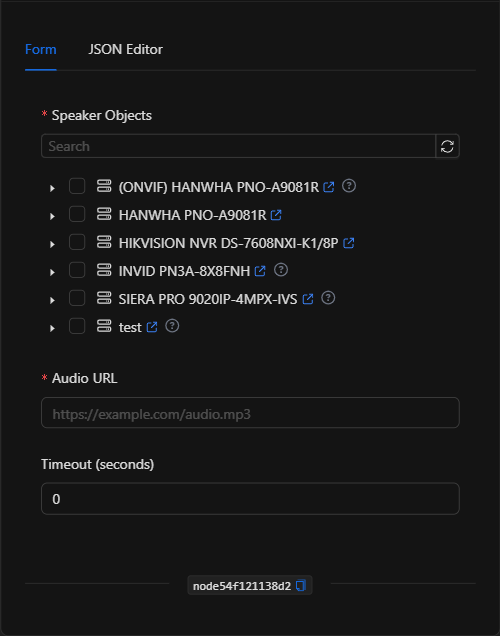
Form View
1. Speaker Objects *Required
The speakers where the audio will be played. The selector is automatically filtered to show only objects of type speaker (speaker). Expand the device and check the desired speaker(s). The audio plays on all selected speakers.
2. Audio URL *Required
The public URL of the audio file to play (for example, an .mp3 file). It must be accessible from the device/platform. Supports template expressions for using dynamic audio.
3. Timeout (seconds)
Maximum time (in seconds) associated with playback. With 0, the driver's default behavior is used.
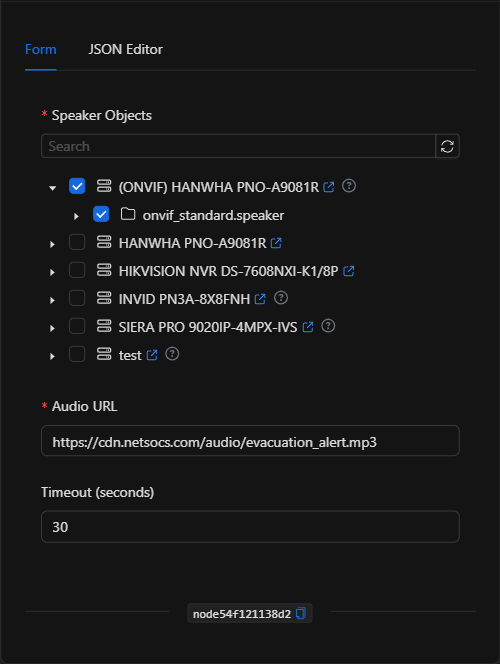
JSON Editor View
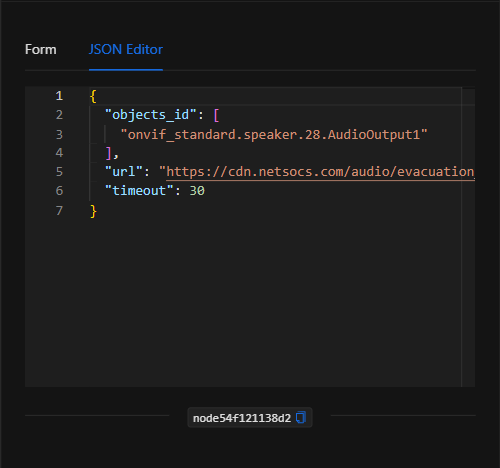
JSON Structure (Input Parameters)
{
  "objects_id": ["onvif_standard.speaker.28.AudioOutput1"],
  "url": "https://cdn.netsocs.com/audio/evacuation_alert.mp3",
  "timeout": 30
}
JSON Fields
| Field | Type | Description |
|---|---|---|
objects_id |
array (string) | IDs of the speaker objects where the audio will be played. |
url |
string | Public URL of the audio file. Supports template expressions. |
timeout |
number | Maximum time (seconds) associated with playback (0 = default). |
Output: Where the node's data comes from
The node sends the play command to the driver of each selected speaker; it does not produce a data payload. When executed successfully, the node finishes marked as successful (green border). Actual playback depends on the audio device being available and the URL being accessible.
Usage Examples
Example 1: Evacuation message on fire alarm
Use case: When a fire alarm triggers, an evacuation message is automatically played on the speakers in the affected zone.
- Speaker Objects: the speaker on the camera/device in the zone
- Audio URL:
https://cdn.netsocs.com/audio/evacuation_alert.mp3 - Timeout:
30
(see JSON structure above)
Example 2: Deterrent warning on intrusion
Use case: When motion is detected outside working hours in a restricted area, a deterrent message is played on the nearest speaker.
- Audio URL:
https://cdn.netsocs.com/audio/restricted_area_warning.mp3
Validation and Errors
| Condition | Common cause / fix |
|---|---|
| Audio does not play | Verify that the URL is public and accessible from the device/platform. |
| No speakers available to select | The device does not expose a speaker object; check that the speaker is integrated and enabled. |
| No objects selected | Select at least one speaker in Speaker Objects. |
Best Practices
- Use public and stable URLs: host audio files in an accessible and permanent location so the device can download them.
- Short and clear audio: prefer brief, intelligible messages for alerts and announcements.
- Group by zone: select the speakers for the relevant zone for each scenario, avoiding broadcasting throughout the entire facility when unnecessary.
- Combine with other actions: chain with notifications or alarm activation for a complete response protocol.