Documentation: Get Object Node
Overview
The Get Object Node is a read-only query action node that retrieves from the platform a list of objects that match the defined criteria. It allows searching for objects by their ID, by conditions on their state properties, and paginating results with limit and offset.
Unlike the Get Object State node, which reads the state of a specific object, this node performs a search/filter across the platform's set of objects and returns all matching ones. It is ideal for IoT logic that needs to act on dynamic sets of devices (for example, "all sensors whose temperature exceeds a threshold").
When to use this node?
Use this node when you need to:
- Dynamically find which objects meet a condition (for example, all sensors with a
temperaturegreater than 8 °C). - Obtain a list of objects to then iterate over them with the Iterate Items node and perform an action on each one.
- Build dynamic dashboards or reports by querying objects by state or properties.
- Verify how many devices are in a certain state before making a decision in the flow.
Node Configuration
The node has two configuration tabs at the top: Form and JSON Editor.
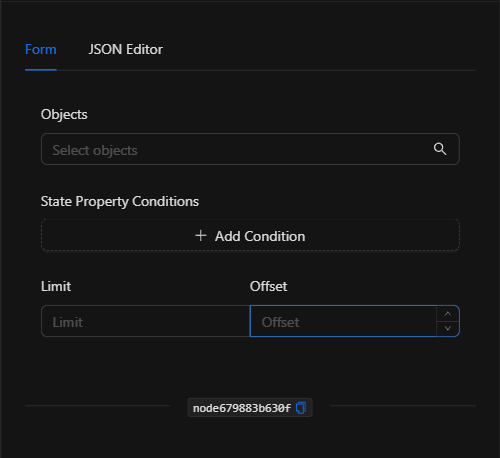
Form View
1. Objects *Optional
Allows you to restrict the search to a specific set of objects. Click the field to open the Select Objects modal and check the desired objects. If left empty, the search is performed across all objects (bounded by conditions and limit).
2. State Property Conditions *Optional
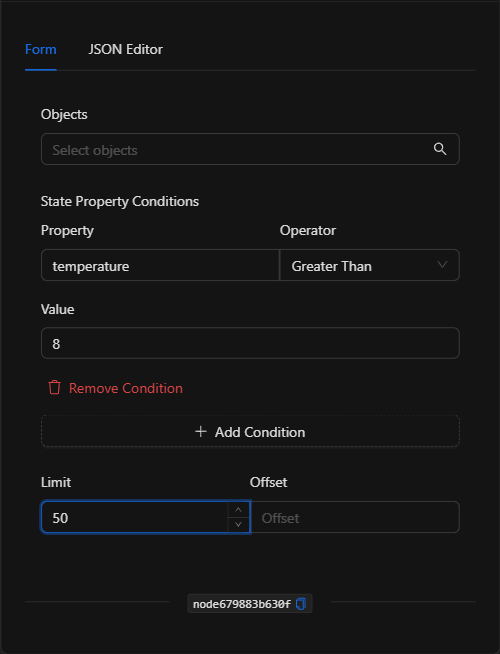
Allows filtering objects based on the values of their state properties. Click Add Condition to add a condition, composed of three fields:
- Property: The name of the state property to evaluate (for example,
temperature,battery_level,state). - Operator: The comparison to apply. Available operators:
| Operator (UI) | Value | Meaning |
|---|---|---|
| Equal | EQUAL |
Equal to |
| Not Equal | NOT_EQUAL |
Not equal to |
| Greater Than | GREATER_THAN |
Greater than |
| Less Than | LESS_THAN |
Less than |
| Greater Than Or Equal | GREATER_THAN_OR_EQUAL |
Greater than or equal to |
| Less Than Or Equal | LESS_THAN_OR_EQUAL |
Less than or equal to |
| In | IN |
Contained in a list |
| Not In | NOT_IN |
Not contained in a list |
| Like | LIKE |
Partial text match |
| Not Like | NOT_LIKE |
Does not partially match |
| Exists | EXISTS |
The property exists |
| Not Exists | NOT_EXISTS |
The property does not exist |
- Value: The comparison value. (This field is hidden when the operator is
ExistsorNot Exists, since no value is required.)
You can add multiple conditions; they are combined to narrow the result. Use Remove Condition to delete one.
3. Limit and Offset *Optional
- Limit: Maximum number of objects to return (pagination).
- Offset: Number of results to skip from the beginning (pagination).
JSON Editor View
In the JSON Editor tab you can view and directly edit the full query:
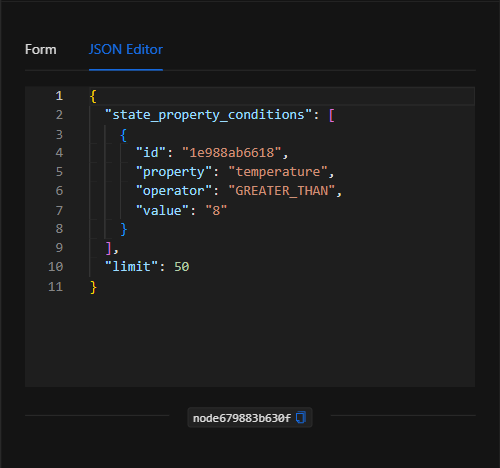
JSON Structure (Input Parameters)
Below is the JSON structure generated when configuring the node:
{
  "state_property_conditions": [
    {
      "id": "1e988ab6618",
      "property": "temperature",
      "operator": "GREATER_THAN",
      "value": "8"
    }
  ],
  "limit": 50
}
JSON Fields
| Field | Type | Description |
|---|---|---|
object_ids |
array (string) | (Optional) List of object IDs to restrict the search to. |
state_property_conditions |
array (object) | (Optional) List of filtering conditions on state properties. |
state_property_conditions[].property |
string | Name of the state property to evaluate. |
state_property_conditions[].operator |
string | Comparison operator (see operator table). |
state_property_conditions[].value |
string | Comparison value (not applicable for EXISTS / NOT_EXISTS). |
limit |
number | (Optional) Maximum number of results to return. |
offset |
number | (Optional) Number of results to skip (pagination). |
Output: Where the node's data comes from
When the query executes successfully, the node returns in its Output a list (array) of objects that meet the criteria, each with its identifier, state, and state properties.
Example output (representative)
[
  {
    "object_id": "ajax_enterprise_api.sensor.device.30AA3100",
    "name": "Termostato Bobeda",
    "domain": "ajax_enterprise_api.sensor.device",
    "state": "ACTIVE",
    "state_additional_properties": {
      "temperature": 12,
      "battery_level": 87
    }
  }
]
Using the output in subsequent nodes
The output of this node is frequently used as input to the Iterate Items node to process each found object one by one. You can also reference individual elements using the node's key:
{{node_key[0].object_id}}
{{node_key[0].state_additional_properties.temperature}}
(Remember to replace node_key with the key automatically assigned to the node on the canvas.)
Usage Examples
Example 1: Find temperature sensors above the threshold
Use case: Get all sensors whose temperature property exceeds 8 °C to then notify or act on them.
- State Property Conditions:
temperatureGreater Than8 - Limit:
50
Configuration JSON:
{
  "state_property_conditions": [
    {
      "property": "temperature",
      "operator": "GREATER_THAN",
      "value": "8"
    }
  ],
  "limit": 50
}
Example 2: List devices with low battery
Use case: Get the sensors whose battery level is less than or equal to 20% in order to schedule maintenance.
- State Property Conditions:
battery_levelLess Than Or Equal20
Configuration JSON:
{
  "state_property_conditions": [
    {
      "property": "battery_level",
      "operator": "LESS_THAN_OR_EQUAL",
      "value": "20"
    }
  ]
}
Validation and Errors
| Condition / Common cause / fix |
| :--- | :--- |
| Result is empty ([]) | No object meets the conditions. Check the property name, operator, and value. |
| The property does not filter as expected | Verify that the property name (property) exactly matches the key used in the object's state properties. |
| Too many results | Use limit and offset to paginate and control the number of returned objects. |
Best Practices
- Name the node descriptively: Change the node name on the canvas (e.g., "Find hot sensors") to identify it and reference its output clearly.
- Combine with Iterate Items: The most common pattern is Get Object → Iterate Items to execute an action for each found object.
- Use the limit: Always define a reasonable
limitin broad queries to avoid processing overly large sets. - Validate property names: Make sure you know the actual state properties of your objects (you can view them in Settings ▸ Objects) before creating conditions.