Documentation: Agent Node
Overview
The Agent Node is an action node that executes an artificial intelligence agent capable of reasoning, deciding, and using tools to fulfill an instruction. Unlike direct analysis nodes, the Agent orchestrates a language model (LLM) together with memory and a set of tools connected to it, enabling it to carry out multi-step tasks autonomously.
In IoT and security environments, the Agent makes it possible to build intelligent assistants that, for example, query events, analyze images, search for information, and execute actions — combining multiple capabilities within a single conversation or task.
When to use this node?
Use this node when you need to:
- Build a conversational assistant over platform data (events, objects, cameras).
- Solve multi-step tasks that require reasoning and tool use.
- Combine a model + memory + tools in a single intelligent flow.
- Automate analyses that a single AI node cannot resolve on its own.
Architecture: connecting Model, Memory, and Tools
The Agent does not work alone: it requires you to connect auxiliary nodes through its specialized connectors on the canvas:
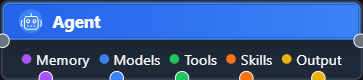
- Memory: a memory node (e.g., Agent Memory MongoDB) so the agent can remember the conversation context.
- Models: the language model that reasons (one).
- Tools: one or more tools the agent can invoke (event search, HTTP, human confirmation, etc.).
- Skills and Output: additional capabilities and the agent's output.
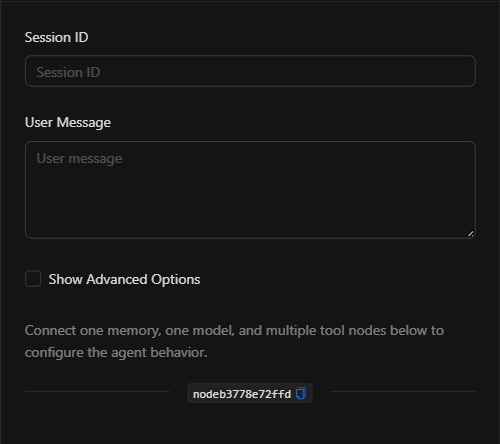
NOTE: As the node itself states: "Connect one memory, one model, and multiple tool nodes below to configure the agent behavior."
Node Configuration
Main Fields
1. Session ID
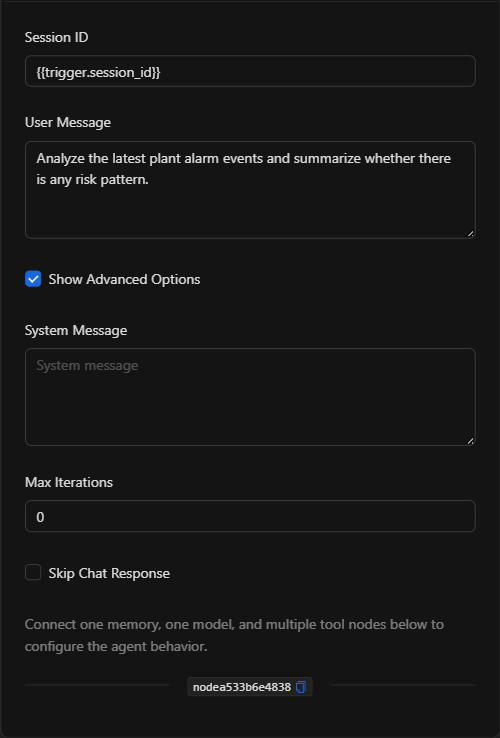
Conversation session identifier. Keeps context across messages (e.g., {{trigger.session_id}}). Essential when using memory.
2. User Message
The instruction or question the agent receives (e.g., "Analyze the latest plant alarm events and summarize whether there is any risk pattern.").
Advanced Options (Show Advanced Options)
Enabling the Show Advanced Options checkbox reveals:
- System Message: defines the role and behavior of the agent.
- Max Iterations: maximum number of reasoning/tool-use steps the agent may perform.
- Skip Chat Response: if enabled, the agent does not emit a chat response (useful when only the tool side-effects matter).
JSON Structure (Input Parameters)
{
  "session_id": "{{trigger.session_id}}",
  "user_message": "Analyze the latest plant alarm events and summarize whether there is any risk pattern.",
  "system_message": "",
  "max_iterations": 0,
  "skip_chat_response": false
}
JSON Fields
| Field | Type | Description |
|---|---|---|
session_id |
string | Conversation session identifier. |
user_message |
string | The instruction/question for the agent. |
system_message |
string | (Advanced) Defines the agent's role/behavior. |
max_iterations |
number | (Advanced) Maximum reasoning/tool-use steps. |
skip_chat_response |
boolean | (Advanced) If true, the agent does not emit a chat response. |
Output: Where the node's data comes from
The agent's response (text and/or results from the tools used) is available at the node's output and can be referenced in downstream nodes with {{node_key}}.
Usage Examples
Example 1: Event analysis assistant
Use case: An agent that, upon receiving a question, queries plant events (via a connected event-search tool) and summarizes risk patterns.
- Models: a connected model (e.g., GPT/Claude).
- Memory: Agent Memory MongoDB to remember the conversation.
- Tools: event search tool.
- User Message:
Analyze the latest plant alarm events and summarize whether there is any risk pattern.
Example 2: Agent with human confirmation
Use case: An agent that can execute sensitive actions only after human approval, by connecting the Human Confirmation Tool.
Validation and Errors
| Condition | Common cause / fix |
|---|---|
| The agent does not respond | Verify that a model is connected to the Models connector. |
| Does not remember context | Connect a memory node and use a consistent session_id. |
| The agent does not use tools | Connect the required tools to the Tools connector. |
| Gets stuck in a loop | Adjust max_iterations to limit the agent's steps. |
Best Practices
- Always connect a model: The agent requires at least one model to reason.
- Use memory for conversations: Connect a memory node and maintain a stable
session_idfor context-aware dialogues. - Clear System Message: Define the agent's role and limits precisely.
- Limit iterations: Set
max_iterationsto avoid unwanted costs or infinite loops. - Human confirmation for sensitive actions: Use the Human Confirmation Tool when the agent may execute critical actions.