Documentation: Lock Flow Node
Overview
The Lock Flow Node is an action node that implements a concurrency lock (mutex) over the automation. It guarantees that only one execution at a time advances through the protected section of the flow: the first execution to arrive acquires the lock and continues through the Flow free output; any other execution that arrives while the lock is held is diverted through the Flow locked output.
In IoT and industrial environments this is key for preventing conflicting simultaneous actions: ensuring two automations do not open the same barrier at the same time, that a maintenance routine is not triggered twice on the same production line, or that a critical command to a device is not executed concurrently.
When to use this node?
Use this node when you need to:
- Serialize executions: prevent a critical process from running twice at the same time (concurrency control).
- Implement a per-resource lock (per production line, per device, per zone) using a lock identifier.
- Avoid race conditions when multiple events could trigger the same automation almost simultaneously.
- Build flows with two paths: one for when the resource is free and another for when it is busy.
Architecture: the two outputs (Flow free / Flow locked)
The node exposes two output connectors:
- Flow free (green): taken when the execution successfully acquires the lock. Connect the protected actions here (those that should only run one execution at a time).
- Flow locked (amber): taken when the lock was already held by another execution. Connect here what should happen when the resource is busy (for example, log the event, send a notification, or simply end).
Node Configuration
The node has two configuration tabs: Form and JSON Editor.
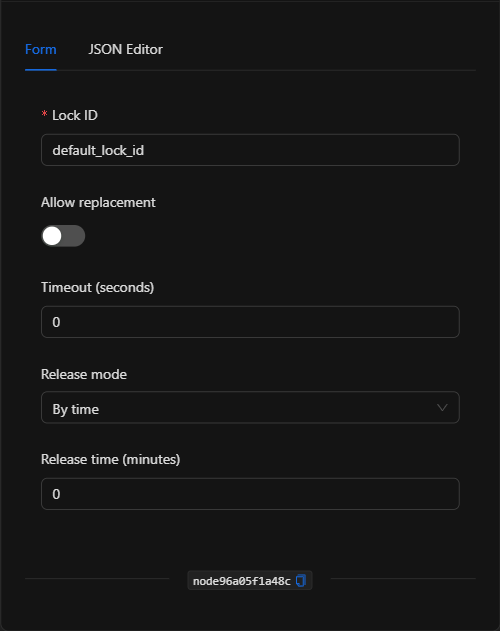
Form View
1. Lock ID *Required
Identifier for the lock. All executions that use the same lock_id compete for the same lock. Use a descriptive identifier per resource (for example, production_line_1). Supports template expressions to generate dynamic locks per object (for example, barrier_{{trigger.object_id}}).
2. Allow Replacement
Toggle that, when enabled, allows a new execution to take the lock even if it is already held (replacing the current holder). Disabled by default, so the lock respects the first execution that acquired it.
3. Timeout (seconds)
Maximum time (in seconds) the execution will wait to acquire the lock before being diverted through Flow locked. With 0, it does not wait: if the lock is busy it goes directly to Flow locked.
4. Release Mode
Defines how the lock is released:
- By time: the lock is released automatically after a set time (defined in Release time).
- By automation completion: the lock is released when the automation finishes its execution.
5. Release Time (minutes)
When the mode is By time, indicates the minutes after which the lock is released automatically. It is required and must be greater than 0 when the mode is By time (acts as a safeguard so a lock does not remain held indefinitely).
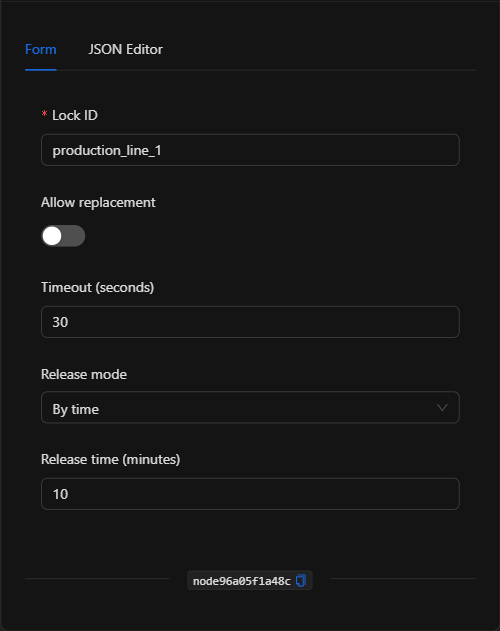
JSON Editor View
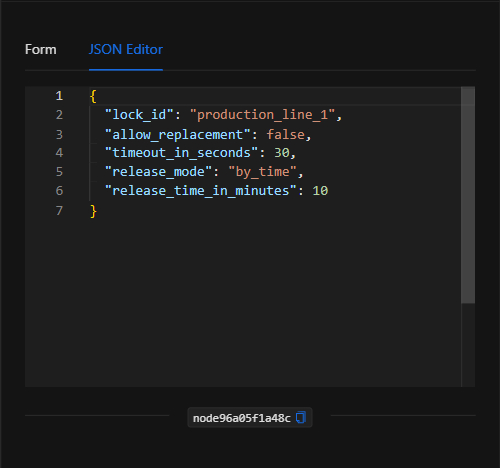
JSON Structure (Input Parameters)
{
  "lock_id": "production_line_1",
  "allow_replacement": false,
  "timeout_in_seconds": 30,
  "release_mode": "by_time",
  "release_time_in_minutes": 10
}
JSON Fields
| Field | Type | Description |
|---|---|---|
lock_id |
string | Lock identifier. Executions with the same value share the lock. |
allow_replacement |
boolean | If true, a new execution can take the lock even if it is already held. |
timeout_in_seconds |
number | Seconds to wait to acquire the lock before going to Flow locked (0 = do not wait). |
release_mode |
string | Release mode: by_time or by_automation_completion. |
release_time_in_minutes |
number | Minutes after which the lock is released (required and > 0 when release_mode is by_time). |
Output: Where the node's data comes from
The node does not produce a data payload; its effect is flow control: it routes the execution through Flow free (lock acquired) or Flow locked (lock busy). The actions connected to each output determine the behavior based on the lock state.
Usage Examples
Example 1: Prevent concurrent maintenance on a production line
Use case: Multiple conditions can trigger the maintenance routine for Line 1, but only one should run at a time. The node acquires the lock production_line_1; if a routine is already running, the new execution is diverted and does not interfere.
- Lock ID:
production_line_1 - Timeout:
30seconds - Release mode:
By time - Release time:
10minutes - Flow free → run the maintenance routine. Flow locked → log that one was already running.
(see JSON structure above)
Example 2: Per-device lock with a template
Use case: An automation operates on different vehicle barriers. Using a dynamic per-object lock prevents two simultaneous commands from being sent to the same barrier without blocking the others.
- Lock ID:
barrier_{{trigger.object_id}} - Release mode:
By automation completion
Validation and Errors
| Condition | Common cause / fix |
|---|---|
release_time_in_minutes is required when release_mode is by_time |
The mode is By time but the release time is 0 or empty. Set a value in minutes greater than 0. |
| Execution always goes to Flow locked | The lock is held and timeout is 0, or a previous lock was never released. Adjust the timeout or the release mode. |
| The lock is not released | If using By time, verify that the Release time is reasonable; if using By automation completion, make sure the automation actually finishes. |
Best Practices
- One
lock_idper resource: use descriptive identifiers (per line, device, or zone) so the lock protects exactly what it should. - Always define a time safeguard: with By time, a sensible Release time prevents a lock from remaining held forever if a failure occurs.
- Connect both outputs: use Flow locked to log or notify when the resource is busy, rather than silently dropping the event.
- Use
Allow replacementwith care: only when a new execution should take priority over the previous one; otherwise, leave it disabled.