Documentation: Increment State Node
Overview
The Increment State Node is an action node that numerically modifies the state of one or more objects, or a property of their state, by applying an arithmetic operation (increment, decrement, multiply, divide, modulo, or set) to the current value.
Unlike Modify Object State —which sets a fixed value— this node operates on the existing value, making it ideal for counters and accumulators in IoT and industrial environments: counting how many times a sensor has been triggered, tracking the number of machine cycles, accumulating units produced, or deducting inventory.
When to use this node?
Use this node when you need to:
- Maintain a counter associated with an object (activations, openings, cycles, alarms).
- Accumulate or deduct a quantity from a previous value (production, inventory, consumption).
- Apply arithmetic operations (multiply, divide, modulo) to the state or a numeric property of an object.
- Keep incremental metrics without having to manually read, calculate, and rewrite the value.
Node Configuration
The node has two configuration tabs: Form and JSON Editor.
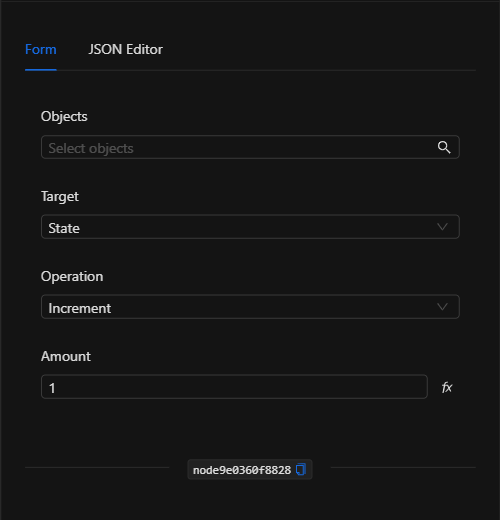
Form View
1. Objects *Required
The objects on which the operation will be applied. Click the field to open the object selector and select one or more (tabs Groups / Devices). The operation is applied to all selected objects.
2. Target
Defines what the operation is applied to:
- State: operates directly on the numeric state of the object.
- Property: operates on a property of the state (enables the Property Name field).
3. Property Name *Conditional
Appears only when Target is Property. Specifies the name of the numeric property to modify (for example, trigger_count).
4. Operation
The arithmetic operation to apply to the current value:
- Increment, Decrement, Multiply, Divide, Modulo, and Set (assign a fixed value).
5. Amount / Value
The operand of the operation (default 1). The label changes to Value when the operation is Set. Accepts a fixed value or, via the template button (ƒ), a template expression to take the amount from another node (for example, {{node_key.response.value}}).
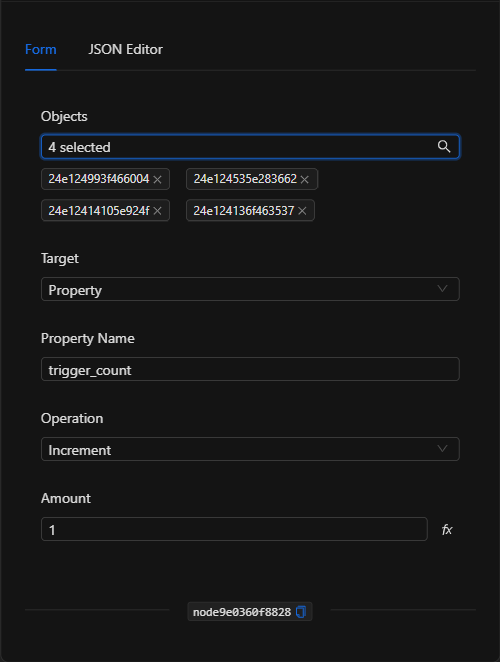
JSON Editor View
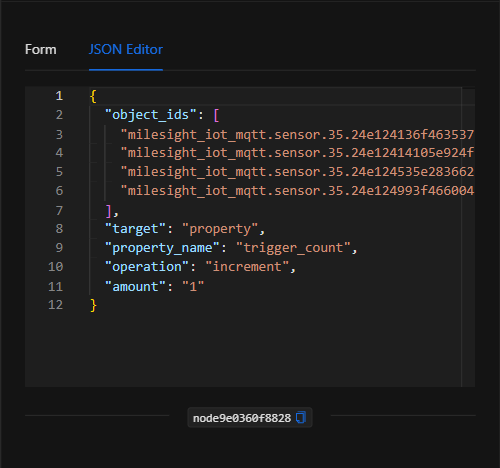
JSON Structure (Input Parameters)
{
  "object_ids": ["milesight_iot_mqtt.sensor.35.24e124136f463537"],
  "target": "property",
  "property_name": "trigger_count",
  "operation": "increment",
  "amount": "1"
}
JSON Fields
| Field | Type | Description |
|---|---|---|
object_ids |
array (string) | IDs of the objects on which the operation is applied. |
target |
string | state (on the state) or property (on a property of the state). |
property_name |
string | Name of the property to modify (required when target is property). |
operation |
string | Operation: increment, decrement, multiply, divide, modulo, or set. |
amount |
string | Operand of the operation (default 1). Supports template expressions. |
Output: Where the node's data comes from
The node applies the operation and persists the new value in the state/property of each selected object. Its effect is visible in the updated state of the objects; the node finishes marked as successful (green border).
Usage Examples
Example 1: Count sensor activations
Use case: Every time an IoT sensor is triggered, a trigger_count property is incremented by 1 to track the number of activations for the day.
- Objects: the sensor (
milesight_iot_mqtt.sensor) - Target:
Property - Property Name:
trigger_count - Operation:
Increment - Amount:
1
(see JSON structure above)
Example 2: Accumulate units produced
Use case: At the end of each batch, the quantity produced —taken from a previous node— is added to the line's running total.
- Target:
Property· Property Name:units_produced - Operation:
Increment - Amount:
{{trigger.body.batch_units}}
Validation and Errors
| Condition | Common cause / fix |
|---|---|
| The value is not modified | Verify that the object has a numeric state/property; arithmetic operations require numbers. |
| Missing property | If Target is Property, make sure the correct Property Name is specified. |
| Division by zero | With the Divide operation, avoid an Amount of 0. |
Best Practices
- Initialize the counter: make sure the property/state has an initial numeric value (you can set it with Modify Object State or with the Set operation).
- Name properties clearly: use descriptive names (
trigger_count,units_produced) to distinguish each metric. - Reset when appropriate: combine with the Set operation (to
0) or with [[memory-delete]] to reset counters at the start of a cycle or shift. - Dynamic amounts: use template expressions in Amount to accumulate values coming from other nodes in the flow.